Verify a file backup archive: from tar to canary files
A file archive always looks like a successful backup. A name, a date, a plausible size. What decides whether you get your files back is what was written next to the archive when it was produced, and whether anyone has ever unpacked it.
This guide covers the whole chain. By the end you will know what truncates an archive without saying so, how to produce a verifiable archive along with its checksum, how to write a backup script that cannot report success on an empty archive, how to check the archive without unpacking it and then by extracting it for real, and why counting files proves nothing without canary files.
Everything up to that point works with tar, gzip, sha256sum and the AWS CLI, and nothing else. The last section shows how to run the same checks on a schedule instead of by hand, which is what RestoreProof does — but the procedure stands on its own, and the day you need it, it is the one you will follow.
What breaks an archive without saying so
A file archive is treacherous in that it always looks like a successful backup: one file, a size, a date. Here is what actually happens when it is broken.
- The disk was full.
tarwrites up to the last free page, then stops. What you get is a truncated archive: its first files unpack perfectly, the last ones are missing, and no log line says so if nobody read the exit code. - The copy was interrupted. A transfer cut short towards the NAS or towards S3 leaves an object shorter than the original. The backup listing shows it with the right date and the right name.
- The exit code was not read. This is the most frequent case, and the easiest to fix: a failing
tarin a script that does not stop on the error reports success to the scheduler. - The archive is encrypted and nobody has the key. It is intact, it is recent, it is unreadable. An encryption key backed up nowhere but inside the encrypted server is a lost key.
The first three are detectable without unpacking anything, provided you wrote next to the archive what it takes to detect them. The fourth is only detectable by a real decryption, performed somewhere other than the original machine.
Producing an archive you can verify
Two commands, not one:
tar -czf /backups/app_data_20260918_010000.tar.gz -C /srv/app data config
sha256sum /backups/app_data_20260918_010000.tar.gz \
  > /backups/app_data_20260918_010000.tar.gz.sha256
-C /srv/app data config enters the directory before archiving, and therefore records only the data/ and config/ paths. Without -C, the archive holds srv/app/data/... and unpacks into a tree nobody expects.
The second command is the one that changes everything. A checksum written next to the archive, at the moment the archive is produced, later answers a question that no inspection of the file alone can settle: are these the bytes that were written? A truncated archive or an interrupted copy give you a file that opens partially, but never the right digest.
It must be computed on the source server, before the transfer. A digest recomputed after the copy, on the copy, proves nothing beyond the copy being equal to itself.
A checksum is not a signature
sha256sumdetects accidental corruption, not a deliberate change: whoever can rewrite the archive can rewrite the.sha256file sitting next to it. Against ransomware, what protects you is elsewhere — storage the backed-up machine cannot erase, versioned or write-once.
The backup script
#!/bin/bash
set -euo pipefail

ts=$(date +%Y%m%d_%H%M%S)
archive="/backups/app_data_${ts}.tar.gz"

tar -cf - -C /srv/app data config | gzip > "${archive}"
sha256sum "${archive}" > "${archive}.sha256"

aws s3 cp "${archive}" s3://sauvegardes-shopdemo/files/
aws s3 cp "${archive}.sha256" s3://sauvegardes-shopdemo/files/
Without
pipefail, a failed archive comes out as a successIn
tar | gzip, the shell only looks at the exit code of the last link.gzipsucceeds at compressing an empty or truncated stream, so the script returns 0 and the scheduler is happy.set -o pipefail— included in theset -euo pipefailabove — makes the whole line fail as soon astarfails. It is the number one cause of empty backups that stay green for months.
The timestamp in the file name is not a nicety: an archive always written under the same name leaves no chance of going back to yesterday, and a corrupt archive overwrites the last good one. For retention, a lifecycle rule on the storage deletes objects older than N days with no script to maintain.
Two precautions for the nightly run: that its error output goes somewhere someone reads, and that a run dragging on does not overlap with the next one — flock -n on a lock file settles the second point in one line.
Checking the archive without unpacking it
Three questions, from the cheapest to the most expensive, in this order:
cd /backups
sha256sum -c app_data_20260918_010000.tar.gz.sha256
gzip -t app_data_20260918_010000.tar.gz
tar -tzf app_data_20260918_010000.tar.gz | wc -l
- Are the bytes the right ones?
sha256sum -creads the file back and compares against the recorded digest. It is the only one of the three that catches a silently altered copy. - Does the compressed stream read to the end?
gzip -tdecompresses without writing anything and checks the redundancy checkgzipplaces at the end of the stream. A truncated archive fails here. - Is the catalogue coherent?
tar -tzflists the headers without extracting a single byte to disk. It is also the fastest way to see what the archive really holds at its root.
Extracting for real, into a throwaway directory
Listing is not extracting. Permissions, symbolic links and unexpected paths only show up on extraction.
essai=$(mktemp -d)
tar -xzf /backups/app_data_20260918_010000.tar.gz -C "${essai}"
Note how long it took, and how much room it used. That is your real restore duration and your real space requirement, the only figures worth comparing to what you promised.
What to check after extraction
find "${essai}" -type f | wc -l
du -sb "${essai}"
test -s "${essai}/config/app.yaml"
grep -q "database_url" "${essai}/config/app.yaml"
rm -rf "${essai}"
The first two lines give you the volume: how many files, how many bytes. Compare against yesterday's order of magnitude, not an exact number. That is what catches a backup silently shrinking — the one still holding forty files instead of twelve thousand because a mount point was not mounted at tar time.
But a count is not enough, and it is worth seeing exactly why. The number of files and the total size are aggregates: they do not know which files they are talking about. An archive taken on the wrong directory, a tree where the data has been replaced by cache files, a configuration file truncated to zero bytes among twelve thousand intact files — all of that passes a volume threshold without flinching.
Hence the last two lines: the canary files. A path you name, that you know must exist after the extraction, and that you check holds something you recognize. test -s rejects an empty file, grep -q rejects a file with the right name whose content is not the right one. Pick two or three: the application's configuration file, a data file deep in the tree, and the file most recently written by production.
Automating this verification
What precedes costs an hour, every time. That is the reason these checks, done by hand, end up not being done at all.
RestoreProof replays exactly these commands as a scheduled task, on your own infrastructure: a runner fetches the archive, unpacks it into a disposable workspace, asks the same questions, destroys everything, and signs the result. The data does not leave your premises.
First declare the archive as a source. A NAS share mounted on the runner's machine is declared as a local directory: the path as the runner sees it, the app_data_*.tar.gz pattern, and the most recently modified strategy. For S3, it is the bucket and the prefix; access keys are not entered, the plan carries a reference, env://AWS_ACCESS_KEY_ID, which the runner resolves in its own environment. See adapting the fetch block and secret references.
The Archive Files template then writes the plan, and that plan is the procedure you just ran by hand, line for line:
| By hand | In the plan |
|---|---|
cp from the NAS, or aws s3 cp | fetch, which takes the most recent archive |
tar -xzf into a throwaway directory | unpack, with the auto format |
find | wc -l | RESTOREPROOF_CANARY_MIN_FILES |
du -sb | RESTOREPROOF_CANARY_MIN_TOTAL_SIZE |
test -s and grep -q | RESTOREPROOF_CANARY_FILES, with min_size and contains |
sha256sum of a canary file | the expected_hash key of that same canary file |
rm -rf of the trial directory | the cleanup, always executed |
The only addition is max_age: 26h, and it is the one check an extraction cannot deduce from the content: it fails the run when the most recent archive found at the source is older than that. A backup that stopped being produced three months ago unpacks perfectly. The full plan, ready to paste into the editor, is in the files and archives recipe.
The two probes in the catalogue answer two different questions, and the choice between them depends on the unpack step:
filesystem-canarylooks at the tree that came out of the extraction. It is the one carrying the volume floors and the canary files, and it is the only way to prove a named path exists and holds what it must hold. It needs anunpackstep before it. With no threshold and no named path, it fails on purpose rather than signing an empty green.archive-integrityopens the archive end to end without restoring anything, which is whatgzip -tdoes. It only makes sense in a plan without anunpackstep: as soon as a plan unpacks, the extraction has already walked everything and a corrupt archive has already failed the step. Its use is to confirm that an archive is still openable without paying the disk space of a full extraction. See verifying an archive without decompressing it.
Thresholds are not copied from this page. A trial unpacks your archive, counts the files and the bytes it actually holds, and suggests each floor 5 % below the measured value, with the gte operator.
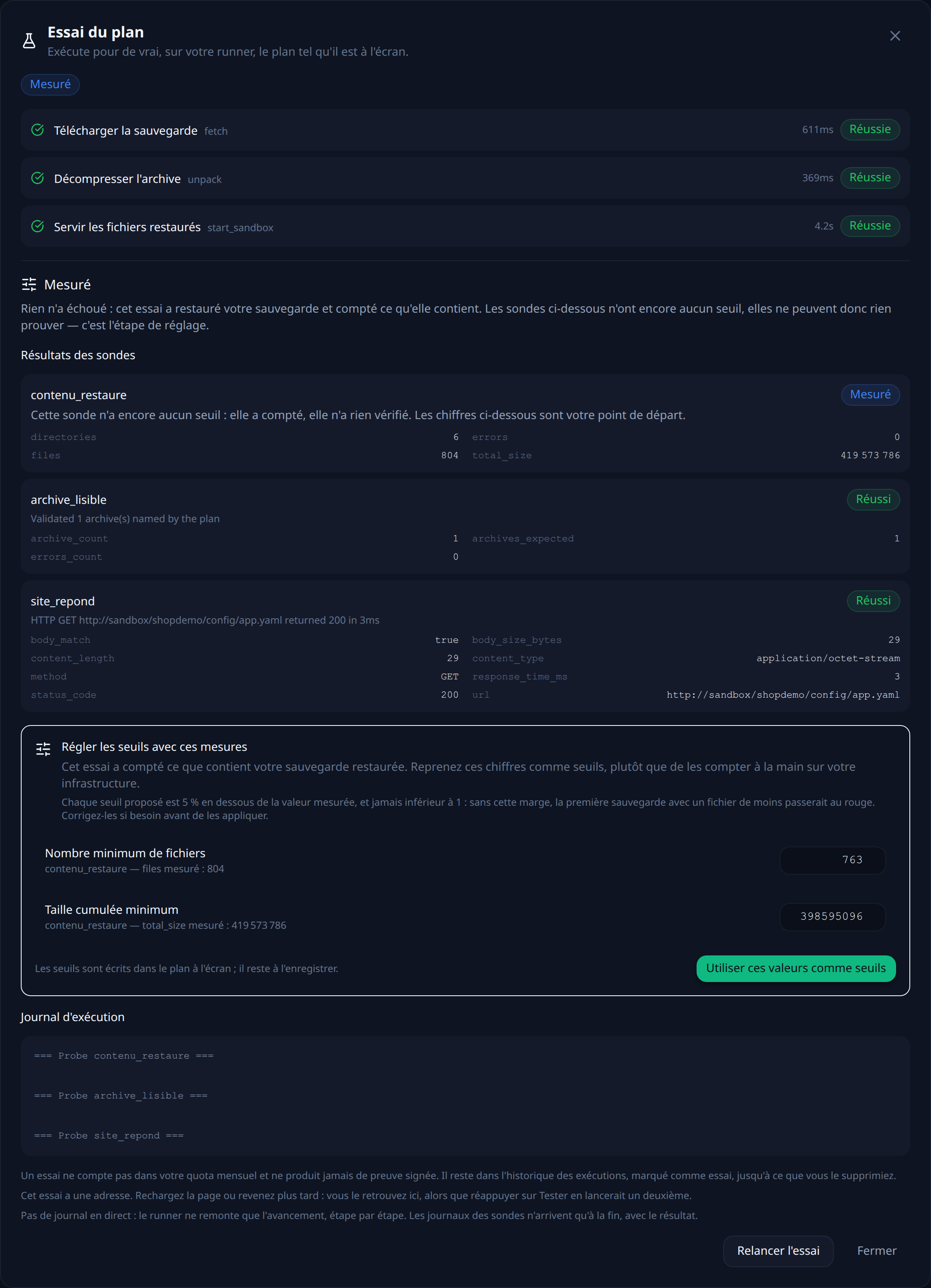
What the count includes
The
filesystem-canarycount covers the whole workspace, including the downloaded archive still sitting in it, and directories do not count as files. The figures suggested by the trial take that into account; a figure counted by hand on your server does not.
That leaves choosing a frequency. Every night puts the run at 2 a.m.: your backup script runs at 1 a.m., so the archive is one hour old when it is tested. The other possible trigger is an HTTP call at the end of that script — the check then covers exactly the archive that was just produced.
Each run leaves a timestamped, signed report naming the archive that was tested and what each probe measured.
What this chain does not prove
It proves that a recent archive opens, unpacks in full, and that the resulting tree holds the files you named with the content you expect. It does not prove that your application works on those files: for that, you need to start it against the restored tree and add an http probe. It says nothing about the original permissions and owners, which tar only records if you asked it to and which the extraction only restores if it runs as root. And it says nothing about what has been written since the last archive — that gap is your RPO, and it is tuned with the backup frequency, not with the checks.
FAQ
A green file backup means it works, doesn't it?
It means the job finished without reporting an error. It says nothing about whether the archive opens. A tar | gzip pipeline without pipefail returns success on a truncated archive. A mount point missing at tar time produces a perfectly valid archive holding forty files instead of twelve thousand. Only an extraction, followed by a check on the content, distinguishes an archive that exists from an archive that restores.
What is a checksum for if the archive already opens?
It answers a question that opening does not settle: are these the bytes that were written? An interrupted copy to the NAS or to S3 leaves a shorter file, which unpacks partially with no visible error on its first files. The digest, computed on the source server before the transfer, is the only thing that catches that case.
How do you detect an archive that stopped being produced?
By its age, not by its content: a March archive unpacks perfectly in September. So you need a check that fails when the most recent archive found at the source is older than a delay you set.
Why isn't counting files enough?
Because a count is an aggregate: it does not know which files it is talking about. An archive taken on the wrong directory, a tree where the data has been replaced by cache, a configuration file truncated to zero bytes among thousands of intact files — all of that passes a volume threshold without flinching. A named path, checked for existence and for a recognizable piece of text, does not.
How do you verify an encrypted archive?
By decrypting it somewhere other than the machine it came from. An encrypted archive can be intact, recent and unreadable: it is enough for the key to exist nowhere but on the backed-up server. Neither the checksum nor opening the file sees that case — only a real decryption, performed from another machine, settles it.