Back up WordPress: the database, the files, and proof the site comes back
Most WordPress backup guides stop at an installed plugin and a ticked box. The day it matters, what decides whether your site comes back is knowing what the backup actually contains, and whether anyone has ever replayed the files.
A WordPress site lives in two places: a MySQL database and a wp-content folder. A backup that takes only one of them does not restore half a site, it restores a broken one. This guide covers the whole chain: what each half holds, what you can leave out, what wp-config.php implies, the script that produces both files and ships them to S3, restoring by hand until the site answers, and the queries that tell you a restored database really holds your posts.
Everything up to that point works with mysqldump, tar, docker and the AWS CLI, and nothing else. The last section shows how to run the same restore and the same checks on a schedule instead of by hand, which is what RestoreProof does — but the procedure stands on its own, and the day you need it, it is the one you will follow.
A WordPress backup is two things
WordPress keeps its data in two places, and a backup that takes only one of them restores nothing usable.
- The MySQL database holds the posts, the pages, the comments, the accounts, the site settings and every plugin's configuration.
wp-contentholds the uploaded media (uploads), the themes and the plugins.
With the database alone, every post references images that no longer exist and the active theme cannot be found: WordPress starts, but on a site stripped of its presentation. With wp-content alone, you have files that nothing ties to a post or an author. You need both, and you need to know that both are there.
What you can leave out:
- the WordPress core —
wp-admin,wp-includesand the PHP files at the root. It is a public download: you fetch it at whichever version you want, and it adds nothing to the archive; - the caches —
wp-content/cacheand whatever an optimisation plugin produces. They regenerate themselves, and they inflate the archive without adding anything to the proof.
That leaves wp-config.php, which is neither the core nor your data.
The case of wp-config.php
This file holds two things of a different nature.
- The database credentials:
DB_NAME,DB_USER,DB_PASSWORD,DB_HOST. They only apply to the server the file lives on, and you normally have them elsewhere. - The salting keys:
AUTH_KEY,SECURE_AUTH_KEY,NONCE_SALTand their neighbours. They sign session cookies. Losing them logs everybody out once, and that is all; regenerating them is a routine operation.
Backing it up saves you half an hour on restore day, and puts your production database password into an archive that travels to remote storage. Leaving it out costs you four lines to rewrite, and that is the choice to prefer when the archive leaves your network. Either way, keep a record of your WordPress version and of the list of active plugins: that is what is most often missing on the day you restore.
The backup script
Two files, produced side by side: the database dump and the wp-content archive.
#!/bin/bash
set -euo pipefail

ts=$(date +%Y%m%d_%H%M%S)
dest=s3://sauvegardes-monsite/wordpress

mysqldump -h db.interne -u wordpress --single-transaction --routines --triggers \
  wordpress | gzip > "/backups/wordpress_${ts}.sql.gz"

tar -czf "/backups/.wp-content_${ts}.tar.gz" -C /var/www/html wp-content
mv "/backups/.wp-content_${ts}.tar.gz" "/backups/wp-content_${ts}.tar.gz"

aws s3 cp "/backups/wordpress_${ts}.sql.gz" "${dest}/mysql/"
aws s3 cp "/backups/wp-content_${ts}.tar.gz" "${dest}/files/"
--single-transaction takes the dump inside a single transaction: WordPress's InnoDB tables come out consistent with each other without the site being locked for the duration. --routines --triggers adds what mysqldump leaves out by default.
The password is not on the command line: it is read from the MYSQL_PWD variable or from a ~/.my.cnf file. A password passed as an argument shows up in the machine's process list, for everyone.
Without
pipefail, a failed dump comes out as a successIn
mysqldump | gzip, the shell only looks at the exit code of the last link.gzipis perfectly happy compressing an empty stream, so the script returns 0 and cron is content.set -o pipefail— included in theset -euo pipefailabove — makes the whole line fail as soon asmysqldumpfails. It is the number one cause of empty backups that stay green for months.
The archive is written under a hidden name, then renamed. That is not a flourish: for the minutes the tar takes, the file is already the most recent one in the directory, and anyone reading "the most recent backup" reads a truncated archive. The mv is atomic, so the file only appears under its final name once it is complete.
Keep the timestamp in both names, and keep the two halves separate: they restore separately, and a single archive holding everything forces you to unpack all of it to check one half. For retention, a lifecycle rule on the bucket deletes objects older than N days with no script to maintain.
Restoring once, by hand
A backup is only proven once restored. Do it once, in full, on a throwaway machine — it is also the procedure you will follow the day it matters.
The database first, in a fresh MySQL:
docker network create wp-essai

docker run -d --name wp-db --network wp-essai \
  -e MYSQL_ROOT_PASSWORD=essai -e MYSQL_DATABASE=wordpress mysql:8.0
until docker exec wp-db mysqladmin ping -h 127.0.0.1 -u root -pessai --silent; do sleep 2; done

gunzip -c /backups/wordpress_20260918_010000.sql.gz \
  | docker exec -i wp-db mysql -u root -pessai wordpress
A single-database dump does not create the database
mysqldump wordpress, as above, contains neitherCREATE DATABASEnorUSE: the database has to exist beforehand, and to be named on the client's command line. That is whatMYSQL_DATABASE=wordpressand the trailingwordpressare for. Withmysqldump --databases wordpress, the dump carries its ownCREATE DATABASEandUSE, and replays without naming a database.
Then the files, and a WordPress started on top of them:
mkdir -p /essai
tar -xzf /backups/wp-content_20260918_010000.tar.gz -C /essai

docker run -d --name wp-site --network wp-essai -p 8080:80 \
  -e WORDPRESS_DB_HOST=wp-db \
  -e WORDPRESS_DB_NAME=wordpress \
  -e WORDPRESS_DB_USER=root \
  -e WORDPRESS_DB_PASSWORD=essai \
  -v /essai/wp-content:/var/www/html/wp-content \
  wordpress:6-apache
The container installs the WordPress core itself: that is the demonstration that it never had to be in the backup. Only wp-content comes from your archive, and the database comes from your dump.
That leaves asking the site whether it answers:
until curl -sf -o /dev/null http://localhost:8080/; do sleep 2; done
curl -s http://localhost:8080/wp-json/wp/v2/posts | head -c 400
A 200 on the home page proves only that the container started: a fresh install answers 200 too. What counts is one of your own posts coming back through the REST API — at that point the whole chain is proven at once: the dump, the database, the application, the HTTP.
Note how long it took. That is your real restore duration, the only one worth comparing to the delay you promised. Then destroy everything: docker rm -f wp-site wp-db and docker network rm wp-essai.
What to check in a restored database
The dump replayed without an error does not mean your data is there. Four questions, in this order:
select count(*) from wp_users;
select count(*) from wp_posts where post_status = 'publish' and post_type = 'post';
select count(*) from wp_options where option_name in ('siteurl', 'home') and option_value <> '';
select max(post_date) from wp_posts where post_status = 'publish';
- An account can still log in. Zero rows in
wp_usersis a restored site nobody administers. - The published posts came back. That is the number that tells a restored site from a fresh install: a fresh install already has every
wp_table, and none of your posts. - The site has an address.
siteurlandhomemust be present and not empty, so exactly two rows. Without them, WordPress serves a site nobody reaches, however complete the restore was. - The data is recent. The date of the latest published post should look like the one you expect, not like last month's. That is what catches a backup job that stopped running.
wp_ is a default, not a rule: a site that changed its prefix needs its own in all four queries, otherwise they query tables that do not exist. See the table prefix.
On the files side, three landmarks and a volume:
ls -d /essai/wp-content/themes /essai/wp-content/plugins /essai/wp-content/uploads
find /essai/wp-content/uploads -type f | wc -l
du -sh /essai/wp-content/uploads
A perfectly shaped tree with an empty uploads is the usual result of a tar over an excluded path, or of a mount that was missing when the backup ran. The file count and the total size are what see it; compare them against the order of magnitude in production, not against an exact number.
Finally, one witness media file, asked of the restored site rather than read off the disk — take the address of an image from your most recent post:
curl -sS -o /dev/null -w '%{http_code}\n' \
  http://localhost:8080/wp-content/uploads/2026/09/photo.jpg
A 404 here, with a full database and a site that answers, is exactly the case half the WordPress backups out there never see.
Automating this verification
What precedes costs an hour or two, every time. That is the reason these tests, done by hand, end up not being done at all.
RestoreProof replays these steps as a scheduled task, on your own infrastructure: a runner fetches the backup, restores it in a disposable container, asks the same questions as above, destroys everything, and signs the result. The data does not leave your premises.
First declare two sources — the dump and the archive share neither prefix nor file pattern: wordpress_*.sql.gz on one side, wp-content_*.tar.gz on the other, with the most recently modified strategy on both. Access keys are not entered: the plan carries a reference, env://AWS_ACCESS_KEY_ID, which the runner resolves in its own environment. See secret references.
The database and the files then make two plans, not one. A red plan tells you which of the two halves is at fault without your having to read a log, and the two do not answer the same question: the first says "my database can be restored", the second says "my media are there". That is the shape every application backed up in two halves takes, described in the self-hosted applications recipe.
Together, those two plans are the procedure you just ran by hand, line for line:
| By hand | In the plan |
|---|---|
aws s3 cp of the dump from the bucket | fetch, which takes the most recent file |
gunzip -c | unpack, in gzip format |
docker run mysql:8.0 | start_sandbox |
mysql -u root … wordpress | restore_mysql, with database: wordpress |
| the four queries | one mysql probe per question |
tar -xzf of the archive | unpack, in tar.gz format, in the second plan |
ls of the three directories | one filesystem-canary probe |
docker rm -f | the cleanup, always executed |
Going all the way to a site that answers takes one more step: a second sandbox starting WordPress on the restored database, and an http probe querying its REST API. The two sandboxes carry the aliases sandbox and sandbox-2, in the order they appear in the plan. That is described in going all the way to a site that answers.
The only addition is max_age, on both sources, and it is the one check a restore cannot deduce from the content: it fails the run when the most recent file found at the source is older than the delay given. 26h lets a nightly backup through, and rejects a backup that missed a night.
The sandbox version
mysql:8.0must match the major version of your server. A dump taken on a newer server does not always replay on an older one. For a site hosted on MariaDB, the sandbox is amariadbimage, and the rest of the plan does not change.
Thresholds are not copied from this page. A trial restores your backup, counts what it actually contains, and suggests each threshold below the measured value. See thresholds are not counted by hand.
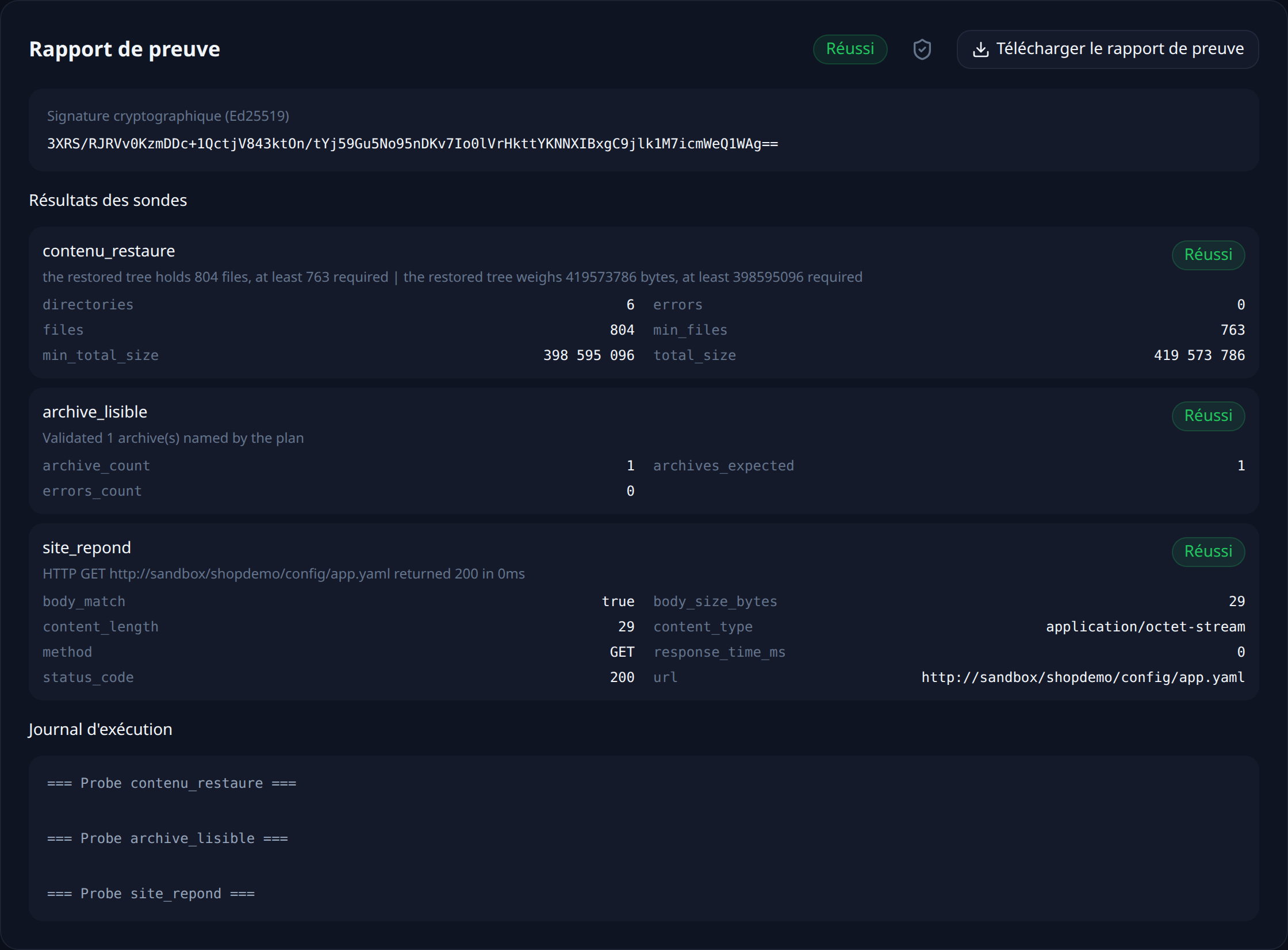
Each run leaves a timestamped, signed report naming the backup that was tested and what each probe measured.
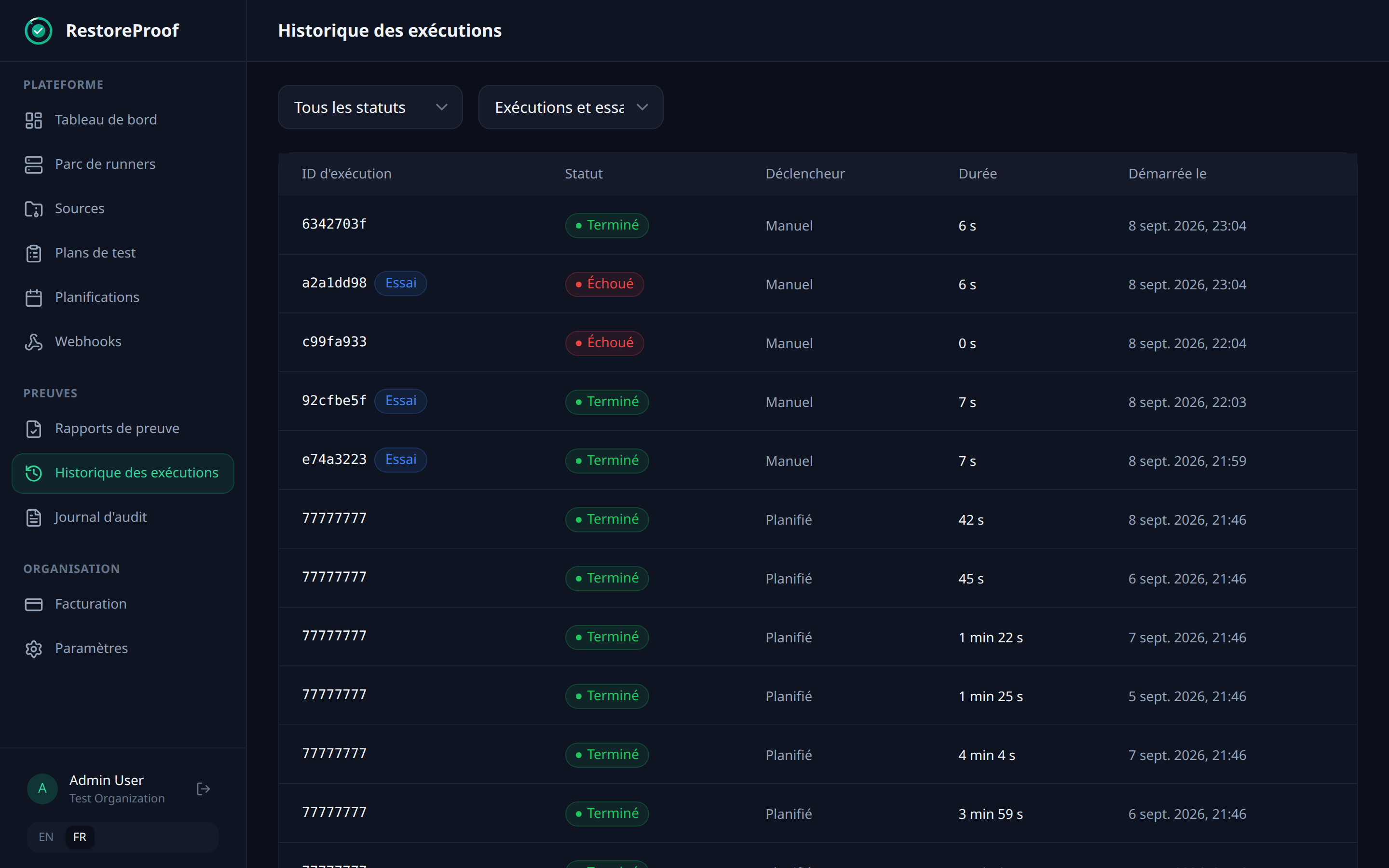
That leaves choosing a frequency. Every night puts the run at 2 a.m.: your backup script runs at 1 a.m., so both files are one hour old when they are tested. The other possible trigger is an HTTP call at the end of that script — the test then covers exactly the files that were just produced. Since there are two plans, the history shows two lines a night, and that is where you see which of the two breaks.
What this chain does not prove
It proves that a recent dump replays into a fresh MySQL, that the restored database holds your accounts, your published posts and the site address, and that the archive holds the expected tree and volume of media.
It does not prove that the two halves come from the same instant. The dump and the archive are produced one after the other: a media file uploaded in between is referenced in the database without being in the archive. The gap is a few minutes, but it exists, and it shrinks by bringing the two commands closer together, not by testing more.
Nor does it prove that every plugin restarts: a plugin expecting a table outside the prefix, a licence or an external service can perfectly well fail on an otherwise complete database. And it says nothing about what has been published since the last dump — that gap is your RPO, and it is tuned with the backup frequency, not with the tests.
Finally, if you chose to leave wp-config.php out, the real restore requires rewriting it. That step is in neither plan: keep it in your written procedure.
Verify every restore, continuously
RestoreProof replays these steps on your own infrastructure, as often as you choose: it fetches the backup, restores it in a disposable container, asks the same questions, destroys everything, and signs the result. Your data never leaves your network.
FAQ
Should I back up the database or the files?
Both, and separately. The database holds the posts, the accounts and the settings; wp-content holds the media, the themes and the plugins. With the database alone, every post points at images that no longer exist. With the files alone, nothing ties a media file to a post.
Should I back up the whole /var/www/html folder?
No. The WordPress core — wp-admin, wp-includes, the PHP files at the root — is a public download you fetch at whichever version you want. Caches regenerate themselves. The part that exists only once is wp-content.
What about wp-config.php?
It holds your production database credentials and the cookie salting keys. Backing it up saves you half an hour on restore day and puts a production password into an archive that travels to remote storage. The salting keys can be regenerated: losing them logs everybody out once, and nothing more.
The restored site answers 200 — does that prove the restore?
No: a fresh install answers 200 too. What proves something is one of your own posts coming back through the REST API, and the address of a media file from that post returning anything other than a 404. A complete database, a site that answers, and images returning 404 is the case half the WordPress backups out there never see.
My tables are not prefixed wp_ — what changes?
The verification queries, which name the tables one by one. wp_ is a default, not a rule: on a site that changed its prefix, a query written with wp_ asks about tables that do not exist and fails instead of counting. The prefix is in wp-config.php, on the $table_prefix line.