Back up Vaultwarden and verify the vault can be restored
A password manager restored halfway is worse than one that is lost: it looks complete. The accounts are there, the entries are there, and nobody notices a thing until the day someone types their master password and nothing decrypts.
This guide covers the whole chain for Vaultwarden. By the end you will know what a backup has to contain besides the database, why copying a SQLite file while it is open is not a backup, how to write a script that cannot report success on a truncated archive, how to restore into a throwaway container and actually open the vault, and which queries tell you a restored vault is still a vault.
Everything up to that point works with sqlite3, tar, docker and the AWS CLI, and nothing else. The last section shows how to run the same checks on a schedule instead of by hand, which is what RestoreProof does — but the procedure stands on its own.
The vault is not in the database
Vaultwarden knows none of your passwords. Every entry is encrypted in the browser before it is sent, and the server only stores the encrypted blob, in the data column of the ciphers table. The master password never leaves the user's machine.
What the server does keep is each account's encryption material, in the users table:
akey, the account's symmetric key, itself encrypted with a key derived from the master password;private_keyandpublic_key, the RSA pair used for sharing.
Hence the consequence that makes this subject different from an ordinary application database: a database restored without that material hands back no readable secret. The accounts are there, the entries are there, everyone types their master password, and nothing decrypts — permanently, because the missing key exists nowhere else. A partial export, a truncated column, a users table restored from a backup older than ciphers: in all three cases the vault looks complete and it is lost.
What sits beside the database
Vaultwarden's data directory — /data in the container — holds what the database does not:
| Content | What it is |
|---|---|
rsa_key.pem | the key that signs session tokens |
attachments/ | the attachments of your entries, encrypted as well |
sends/ | the files behind Bitwarden Sends |
icon_cache/ | site favicons, a cache, nothing to back up |
config.json | the settings made from the admin page |
rsa_key.pem is not the vault's key: it signs tokens. Lose it and Vaultwarden makes another one at start-up, everyone logs in again, and the vaults stay readable. Attachments, on the other hand, are referenced from the database: a database restored alongside an attachments/ tree taken at a different hour gives you entries pointing at files that are not there.
A Vaultwarden backup is therefore two pieces taken together: the database and the data directory.
Two installs, two ways to back up
SQLite, the default install
Without DATABASE_URL, Vaultwarden writes to db.sqlite3, at the root of the data directory. Copying that file while the service is running is not a backup: SQLite keeps recent transactions in a -wal journal next to it, and a cp catches one file and not the other, or both at two different instants.
A hot
cpofdb.sqlite3produces a file that opensThat is what makes the trap expensive: the copied file is not empty, it opens, it contains tables. What is missing is the last writes, or the pages are inconsistent with each other. The
.backupcommand ofsqlite3takes a read lock, follows the journal, and produces a consistent file without stopping the service.
PostgreSQL or MySQL
With DATABASE_URL, the database lives elsewhere and is backed up like any other. The details of the dump, the formats, and what pg_dump leaves out are in Back up PostgreSQL to S3; only the line changes:
pg_dump -h db.interne -U sauvegarde -d vaultwarden --no-owner --no-acl \
  | gzip > "/backups/vaultwarden_${ts}.sql.gz"
In both cases, the data directory is backed up the same way.
The backup script
#!/bin/bash
set -euo pipefail

ts=$(date +%Y%m%d_%H%M%S)
src=/var/lib/vaultwarden
dest=s3://sauvegardes-vaultwarden

sqlite3 "${src}/db.sqlite3" ".backup '/backups/db_${ts}.sqlite3'"
gzip -9 "/backups/db_${ts}.sqlite3"

tar -cf - -C "${src}" --exclude=./icon_cache --exclude='./db.sqlite3*' . \
  | gzip > "/backups/data_${ts}.tar.gz"

aws s3 cp "/backups/db_${ts}.sqlite3.gz" "${dest}/"
aws s3 cp "/backups/data_${ts}.tar.gz" "${dest}/"
The database is excluded from the archive: .backup has already taken it cleanly, and adding it to the tar would put back into the backup the very hot copy we just avoided. icon_cache is excluded because Vaultwarden rebuilds it on its own.
Without
pipefail, a truncated archive comes out as a successIn
tar -cf - … | gzip > file, the shell only looks at the exit code of the last link. Iftarstops along the way — a file vanishing under it, a full disk —gzipstill compresses what it received and returns 0. The script returns 0, cron is happy, and the archive holds half the directory.set -o pipefail, included in theset -euo pipefailabove, makes the whole line fail as soon astarfails.
Keep the timestamp in both file names, and keep them paired: what restores is the database and the directory taken in the same minute, not the latest file on each side. For retention, a lifecycle rule on the bucket deletes objects older than N days with no script to maintain.
Restoring once, by hand
A backup is only proven once restored. Do it once, in full, in a throwaway container — it is also the procedure you will follow the day it matters.
mkdir -p /tmp/vw-essai/data
tar -xzf /backups/data_20260918_010000.tar.gz -C /tmp/vw-essai/data
gunzip -c /backups/db_20260918_010000.sqlite3.gz > /tmp/vw-essai/data/db.sqlite3

docker run -d --name vw-essai -p 8080:80 \
  -e DOMAIN=http://localhost:8080 \
  -v /tmp/vw-essai/data:/data \
  vaultwarden/server:<votre version>
The image must carry the production version
Vaultwarden applies its schema migrations at start-up. An image older than the one that wrote the database refuses to start on it, and a newer image migrates the restored file — which is the right behaviour for a real restore, but not what you want from a test. Use your production's exact version, not
latest.
Then open http://localhost:8080 in a browser, log in with an account's master password, and display the password of one entry. That is the only step that proves the vault decrypts. It needs a human who knows a master password: nobody else can do it, and that is exactly what you want from a password manager.
Note how long it took. That is your real restore duration.
What to check in a restored database
The file opens does not mean the vault is there. Four questions, in this order:
select count(*) from users where length(password_hash) > 0;
select count(*) from ciphers;
select max(updated_at) from ciphers;
select count(*) from users
 where length(password_hash) > 0
   and (akey is null or akey = '' or private_key is null or public_key is null);
- Accounts are left. An account with no password hash is an invited user who never logged in, not a user.
- Entries are left. Compare against the order of magnitude in production, not an exact number: a vault that grows is normal.
- The entries are recent. The last change should be yesterday's, not last month's. That is what catches a backup job that stopped running.
- The encryption material followed. This query must return zero. An active account that lost its
akeyor its key pair is an unreadable vault that looks intact — the case described at the top of this page.
On the file side, two commands are enough:
ls -l /tmp/vw-essai/data/rsa_key.pem
find /tmp/vw-essai/data -type f | wc -l
The signing key is there, and the tree has not melted away. Remember that second number: it is the floor you will give to the automated check.
Then destroy everything: docker rm -f vw-essai and rm -rf /tmp/vw-essai. What you have just handled is a production vault.
Automating this verification
What precedes costs an hour or two, every time. That is the reason these tests, done by hand, end up not being done at all.
RestoreProof replays these steps as a scheduled task, on your own infrastructure: a runner fetches the backup, restores it in a disposable container, asks the same questions, destroys everything, and signs the result. The data does not leave your premises.
First declare each backup as a source — the directory or the bucket, the file name pattern, and the most recently modified strategy. Credentials are not entered: the plan carries a reference, which the runner resolves in its own environment. See the sandbox password and how to adapt the fetch block.
As with the backup, the database and the data directory make two distinct plans: whichever one fails then tells you which of the two pieces is at fault. Every command you have just typed has its step:
| By hand | In the plan |
|---|---|
aws s3 cp from the bucket | fetch, which takes the most recent file |
gunzip -c, tar -xzf | unpack |
docker run postgres:16-alpine | start_sandbox, for a PostgreSQL install |
psql -v ON_ERROR_STOP=1 | restore_postgres, for a PostgreSQL install |
sqlite3 db.sqlite3 on a copy | a sqlite probe, with no sandbox |
| the four queries | one probe per question |
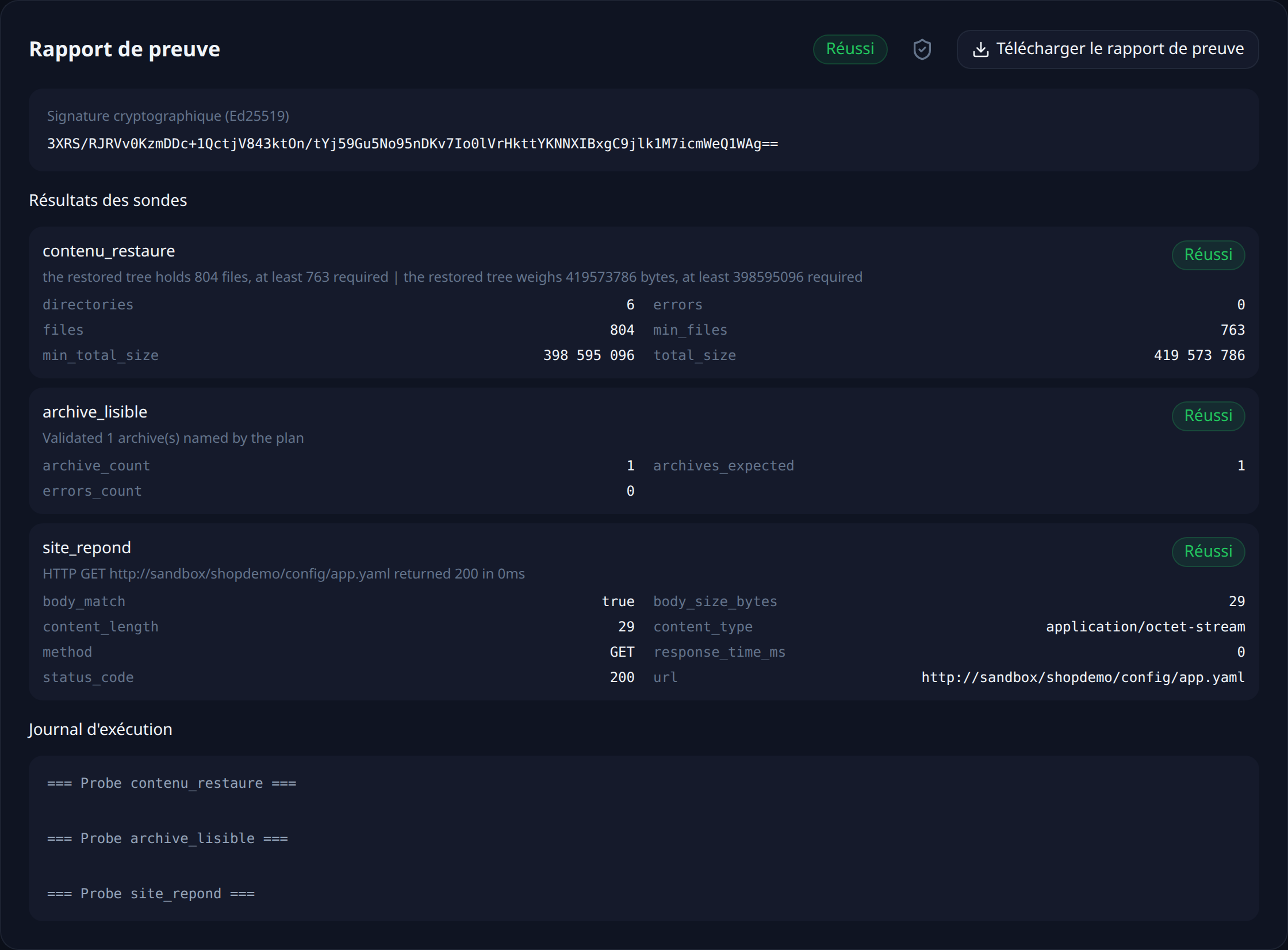
ls -l rsa_key.pem, find … | wc -l | a filesystem-canary probe |
docker rm -f | the cleanup, always executed |
The probes involved, and what each one proves:
sqlitewithRESTOREPROOF_SQLITE_INTEGRITY: fullreads every page of the file. That is what asha256sumdoes not tell you: a digest proves the file has not changed since the copy, not that it was valid at the time of the copy. A backup taken withcpon a live database fails this check. The probe works on a copy of the file, because SQLite needs to write in order to replay the-waljournal when opening it.sqliteorpostgresfor accounts and entries, with thegteoperator and a floor.sqliteorpostgresfor the encryption material, with thezerooperator: the probe does not expect a number, it demands that no account be concerned. That is the probe worth the detour.filesystem-canaryfordata/rsa_key.pem, withRESTOREPROOF_CANARY_MIN_FILESandRESTOREPROOF_CANARY_MIN_TOTAL_SIZE: the expected file is there, and the tree still weighs what it should.
One detail about the sqlite probe: RESTOREPROOF_SQLITE_TARGET expects a table name and quotes it as such, so a condition does not go there. Queries with a where are written in RESTOREPROOF_SQLITE_QUERY, which must return a single number.
The only addition compared with what you did by hand is max_age, and it is the check a restore cannot deduce from the content: it fails the run when the most recent backup found at the source is older than that. The full plans, ready to paste into the editor, are in the self-hosted applications recipe.
What this verification does not do: it decrypts nothing. No probe knows any master password, and that is deliberate — there is no place to put one that is not also a place to steal it from. It proves that the encryption material is present, complete, and attached to the right accounts. Actually opening a vault remains the step from the previous section, to be redone from time to time, by hand.
Thresholds are not copied from this page. A trial restores your backup, counts what it actually contains, and suggests each threshold 5 % below the measured value, with the gte operator.
That leaves choosing a frequency. Every night puts the run after your backup script: the backup is then one hour old when it is tested. The other possible trigger is an HTTP call at the end of that script — the test then covers exactly the files that were just produced.
Each run leaves a timestamped, signed report naming the backup that was tested and what each probe measured.
What this chain does not prove
It proves that a recent backup opens, that it contains accounts and entries, and that each account's encryption material is intact. It does not prove that an entry decrypts: that needs a master password, which has no business being here. Since the two plans are independent, nothing verifies either that every attachment cited by the database exists in the data directory archive — which is why the two backups are taken in the same minute. And it says nothing about what has been added to the vault since the last backup: that gap is your RPO, and it is tuned with the backup frequency, not with the tests.
Verify every restore, continuously
RestoreProof replays these steps on your own infrastructure, as often as you choose: it fetches the backup, restores it in a disposable container, asks the same questions, destroys everything, and signs the result. Your data never leaves your network, and nothing is decrypted.
FAQ
Is backing up the Vaultwarden database enough?
No. The data directory holds the key that signs session tokens, the attachments of your entries, and the files behind Sends. More importantly, the two pieces depend on each other: attachments are referenced from the database, so a database and a file tree taken an hour apart give you entries pointing at files that are not there.
Can db.sqlite3 be copied while Vaultwarden is running?
Not with cp. SQLite keeps recent writes in a -wal journal next to the main file, and a plain copy catches one without the other. The .backup command of sqlite3 produces a consistent file without stopping the service.
Does a Vaultwarden backup contain my passwords in the clear?
No: every entry is encrypted in the browser before it reaches the server, and the master password never leaves the user's machine. A backup still has to be treated like the vault itself, because it contains everything needed to attack the master passwords offline.
How do you verify that a restored vault really decrypts?
By logging in with a master password and displaying an entry. An automated check cannot do that, and should not be able to: there is no place to put a master password that is not also a place to steal it from. What the automated check verifies is that each account's encryption material is present and complete — which is the failure nobody sees.
Which image version should the restore test use?
Your production's exact version, not latest. Vaultwarden applies its schema migrations at start-up: an image older than the one that wrote the database refuses to start on it, and a newer image migrates the restored file. That is the right behaviour for a real restore, not for a test, which has to read the database as it was backed up.