Back up MongoDB to S3 and verify the collections come back
Most MongoDB backup guides stop at the mongodump command line. That is the easy part. What decides whether you get your data back is everything around it: what the dump leaves out, which options change what you will be able to restore, whether the script really fails when the dump fails, and whether anyone has ever replayed the file.
This guide covers the whole chain. By the end you will know what a mongodump holds and what it leaves to the server, when --oplog is worth anything, how to write a backup script that cannot report success on an empty file, how to restore the archive by hand in a throwaway container, and which questions asked in mongosh tell you a restored database actually holds your data.
Everything up to that point works with mongodump, docker and the AWS CLI, and nothing else. The last section shows how to run the same restore and the same checks on a schedule instead of by hand, which is what RestoreProof does — but the procedure stands on its own, and the day you need it, it is the one you will follow.
What a mongodump backs up, and what it leaves out
mongodump reads documents over the server protocol, like any other client. So it backs up data, not a server:
- users and roles are not part of it. They live in the
admindatabase, insystem.usersandsystem.roles; a dump limited to your business database does not hold them, and the restore then gives an intact database where no application account exists; - neither is the server configuration: the instance settings, the replica set membership, the sharding layout of a partitioned cluster;
- nor the other databases on the same server, unless you ask for a full dump.
Indexes, on the other hand, are in the dump — their definition, not their content. mongorestore writes the documents first, then rebuilds each index. On a large collection that is where most of the restore time goes, and it is the reason a restore is almost always slower than the dump that produced it.
A dump is not a copy of the data directory
Both are defensible, but they do not give you the same thing.
A dump is logical: the documents are read back, reinserted, the indexes rebuilt. It restores into another version of MongoDB, onto another machine, into a different topology — a dump taken on a replica set reloads onto a standalone server.
A copy of the data directory (--dbpath) is physical: these are the storage engine's files. It restores much faster on large volumes, but it is only valid for the same MongoDB version and the same storage engine, and it cannot be taken by copying the files of a running server — you have to stop it, or go through a filesystem snapshot that captures the journal along with the data.
For a database of a few gigabytes, mongodump stays the simple choice: one file, readable by any recent MongoDB.
The options that decide what you will be able to restore
--archive writes everything into a single stream instead of a tree of BSON files. That is one object to upload instead of a directory to synchronise, and mongorestore reads it back as is.
--gzip compresses. With --archive, the compression happens in the stream: no intermediate file, and mongorestore --gzip reads it back without decompressing first.
--oplog changes the nature of the backup. Without it, a dump that takes several minutes mixes documents read at different moments: an order can appear without the billing line written in the same transaction. With it, mongodump records the oplog position before starting, then appends the operations that happened while reading, and mongorestore --oplogReplay replays them at the end: the result is the state of the database at one point in time. Two conditions: the oplog only exists on a replica set, and the option only applies to a full dump of the instance, not to a --db.
Finally, the database name is inside the dump. mongodump records each collection under its full namespace, boutique.commandes, and mongorestore writes it back under that same name. Renaming the file changes nothing. That is what makes the mistake in the restore section so easy to make.
The backup script
#!/bin/bash
set -euo pipefail

ts=$(date +%Y%m%d_%H%M%S)
dest=s3://sauvegardes-boutique/mongo

mongodump --host mongo.interne --port 27017 --db boutique --archive \
  | gzip > "/backups/boutique_${ts}.archive.gz"

aws s3 cp "/backups/boutique_${ts}.archive.gz" "${dest}/"
Without
pipefail, a failed dump comes out as a successIn
mongodump | gzip, the shell only looks at the exit code of the last link.gzipcompresses an empty stream very nicely, so the script returns 0 and cron is happy.set -o pipefail— included in theset -euo pipefailabove — makes the whole line fail as soon asmongodumpfails. The variant without a pipe,--archive=/backups/... --gzip, removes the problem at the source:mongodumpwrites the file itself and its exit code is the command's.
Keep the timestamp in the file name: a file always overwritten under the same name leaves no chance of going back to yesterday. For retention, a lifecycle rule on the bucket deletes objects older than N days with no script to maintain.
The account taking the dump needs to read the whole database. A role that is too narrow raises no visible error: it produces a dump where the collections it cannot see are simply missing.
That leaves running it every night. A cron is enough, on two conditions: that its error output goes somewhere someone reads, and that a run dragging on does not overlap with the next one — flock -n on a lock file settles the second point in one line.
Restoring once, by hand
A backup is only proven once restored. Do it once, in full, in a throwaway container — it is also the procedure you will follow the day it matters.
docker run -d --name mongo-essai mongo:7
until docker exec mongo-essai mongosh --quiet --eval 'db.runCommand({ping:1})'; do sleep 1; done

docker cp /backups/boutique_20260918_010000.archive.gz mongo-essai:/tmp/dump.gz
docker exec mongo-essai mongorestore --archive=/tmp/dump.gz --gzip --drop \
  --nsInclude 'boutique.*' --stopOnError
--drop removes each collection before rewriting it: without it, a restore into a container already used mixes the documents of two attempts. --stopOnError stops at the first refused insert, instead of carrying on and handing you a half-restored database that looks like it works.
The database name is the dump's, not the one you want
If the archive was taken on a database named
shop, the--nsInclude 'boutique.*'above matches nothing:mongorestorerestores no document, and exits with success. Nothing in the database warns you, because there is no database. To restore under another name, you have to say so:--nsFrom 'shop.*' --nsTo 'boutique.*'.
Note how long it took. That is your real restore duration, the only one worth comparing to the delay you promised.
What to check in a restored database
mongorestore finishing without an error does not mean the data is there. Four questions, in this order, from a mongosh opened on the container:
use boutique
show collections
db.commandes.countDocuments()
db.commandes.find().sort({ cree_le: -1 }).limit(1)
db.commandes.getIndexes().length
- The collections are there. An empty list means an
--nsIncludethat recognised nothing, or an empty dump that replayed perfectly. - The documents are there.
countDocuments()really counts, unlikeestimatedDocumentCount(), which reads the collection metadata and can report documents that are no longer there. Compare against the order of magnitude in production, not an exact number. - The data is recent. The most recent document should be yesterday's, not last month's. That is what catches a backup job that stopped running without saying anything.
- The indexes were rebuilt. A collection back with its documents but without its indexes behaves correctly and answers in seconds instead of milliseconds. On a production database put back in service, that is enough to make it unusable.
Then destroy everything: docker rm -f mongo-essai.
Automating this verification
What precedes costs an hour or two, every time. That is the reason these tests, done by hand, end up not being done at all.
RestoreProof replays exactly these steps as a scheduled task, on your own infrastructure: a runner fetches the archive, restores it in a disposable container, asks the same questions, destroys everything, and signs the result. The data does not leave your premises.
First declare the backup as a source — the bucket, the prefix, the *.archive.gz pattern, and the most recently modified strategy. Access keys are not entered: the plan carries a reference, env://AWS_ACCESS_KEY_ID, which the runner resolves in its own environment. See secret references.
The MongoDB wizard then writes the plan, and that plan is the procedure you just ran by hand, line for line:
| By hand | In the plan |
|---|---|
aws s3 cp from the bucket | fetch, which takes the most recent file |
| nothing to decompress | no unpack step: the archive is read as is |
docker run mongo:7 | start_sandbox |
mongorestore --archive --gzip --drop | restore_mongo |
db.commandes.countDocuments() | one mongodb probe per collection |
docker rm -f | the cleanup, always executed |
The mongodb probe connects to the restored database, counts the documents of a collection and compares against the threshold, with gte, lte, eq or zero. A Mongo filter in JSON narrows the count: it is no longer "there are orders", it is "there are the paid orders". The host, the port and the database name are not entered — the runner takes them from the sandbox it has just started and from the restore_mongo step.
The only addition is max_age, and it is the one check a restore cannot deduce from the content: it fails the run when the most recent backup found at the source is older than that. A backup from March restores perfectly in September.
The sandbox version
mongo:7must match the major version of your server. A dump taken on a newer server does not necessarily replay on an older one.
Thresholds are not copied from this page. A trial restores your backup, counts what it actually contains, and suggests each threshold 5 % below the measured value, with the gte operator.
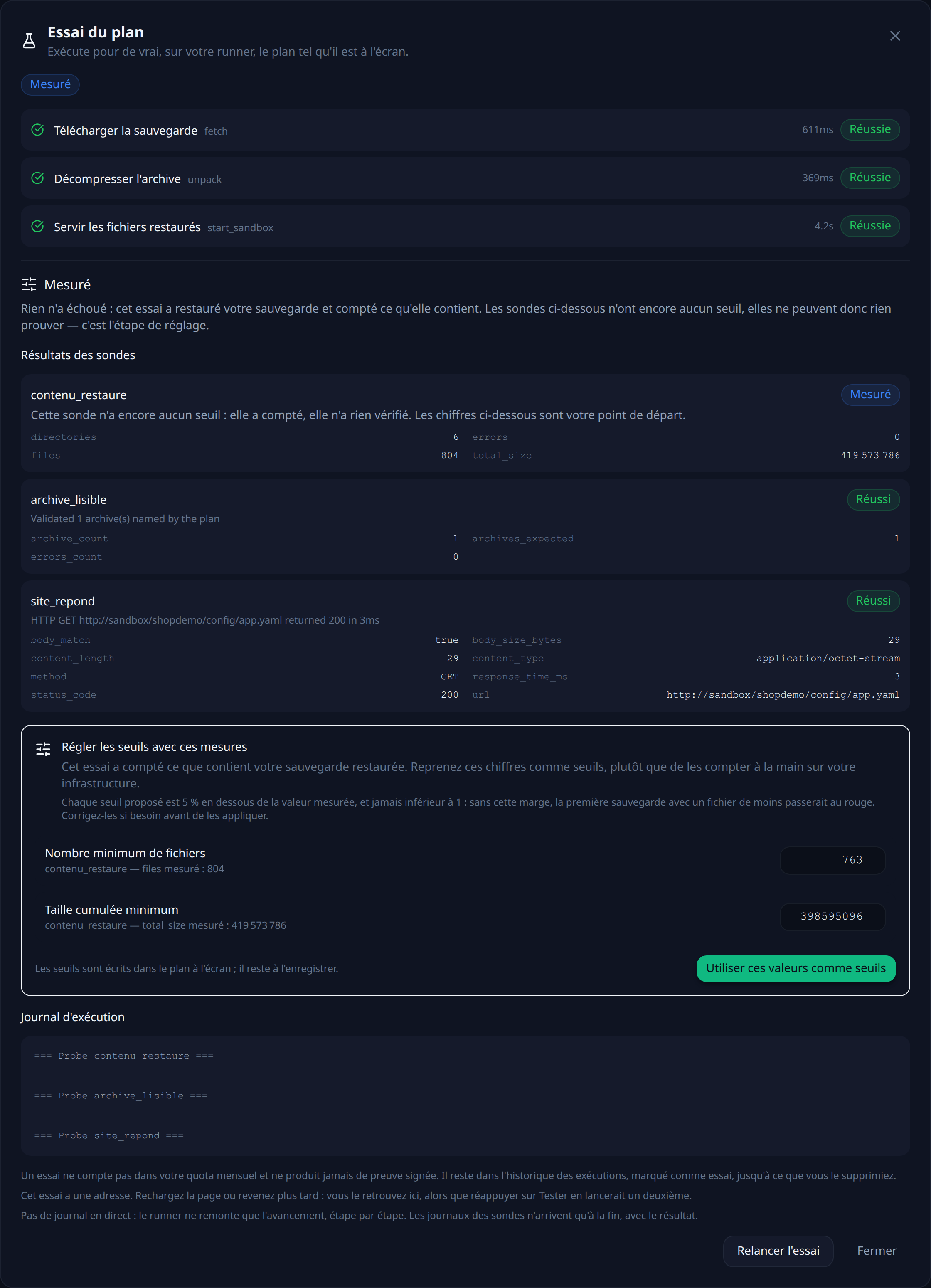
On MongoDB, that trial teaches you two more things, and both are about names — the point on which a Mongo restore breaks most often.
When the collection named in a probe does not exist in the sandbox, the probe lists the collections it did find along with their document counts, and if the whole database is empty, it lists the databases present on the server. So there is nothing to guess: the exact name is in the result, ready to be reused.
As for the restore step, it takes an inventory of the archive before writing anything. If the database the plan asks for is not in it, the step fails immediately, naming the collections the archive actually holds, instead of restoring zero document and reporting a success the way mongorestore would.
That leaves choosing a frequency. Every night puts the run at 2 a.m.: your backup script runs at 1 a.m., so the archive is one hour old when it is tested. The other possible trigger is an HTTP call at the end of that script — the test then covers exactly the file that was just produced.
Each run leaves a timestamped, signed report naming the backup that was tested and what each probe measured. The full plan and the variants are in the MongoDB recipe.
What this chain does not prove
It proves that a recent archive restores into a fresh MongoDB and that the collections come back with their documents. It does not prove that your application works on that database: for that, you need to start it against the sandbox and add an http probe. It says nothing about the users and roles left in admin, which are not in a dump of a business database. And it says nothing about what has been written since the last dump — that gap is your RPO, and it is tuned with the backup frequency, not with the tests.
Verify every restore, continuously
RestoreProof replays these steps on your own infrastructure, as often as you choose: it fetches the archive, restores it in a disposable container, asks the same questions, destroys everything, and signs the result. Your data never leaves your network.
FAQ
What has to be backed up besides the business database?
Users and roles, which live in the admin database and are not in a dump limited to your own. Without them, the restore gives you an intact database where no application account exists and nobody can connect. The server configuration and the replica set membership are not in the dump either, and that is as it should be: they belong to the server.
Is --oplog useful on a standalone server?
No. The oplog only exists on a replica set. On a standalone instance the option has nothing to record, and a dump that takes several minutes stays a mix of documents read at different moments.
Should a mongodump archive be compressed?
Yes, with --gzip, which compresses inside the stream. A compressed archive restores as is: mongorestore --archive=... --gzip reads it back without decompressing first, so there is no intermediate file to plan for and no disk space to reserve for it.
Why does a MongoDB restore fail without restoring anything?
Almost always because of a name. The database name is recorded inside the dump, not in the file name: an --nsInclude matching no namespace in the archive restores no document and exits with success. You have to read what the archive holds before restoring it, or rename with --nsFrom and --nsTo.
Why is a restore slower than the dump that produced it?
Because of the indexes. The dump holds their definition, not their content: mongorestore writes the documents first, then rebuilds each index, and on a large collection that is where most of the time goes. It is also why you check they came back: a collection returned without its indexes answers correctly, in seconds instead of milliseconds.