Backing up Gitea: the database, the repositories, and proof the code came back
A Gitea instance looks like a single service, but it backs up in three parts that live in three different places. That is what makes its backups misleading: one part is missing, and everything looks fine until the day you restore.
This guide covers the whole chain. By the end you will know what each of the three parts holds and what you lose by forgetting one, what gitea dump actually produces and why it stops being the right tool, how to write a backup script that cannot report success on an empty dump, how to restore all of it by hand up to a git clone that works, and which SQL queries tell you a restored database really describes your repositories.
Everything up to that point works with pg_dump, tar, git and docker, and nothing else. The last section shows how to run the same restore and the same checks on a schedule instead of by hand, which is what RestoreProof does — but the procedure stands on its own, and the day you need it, it is the one you will follow.
A Gitea backup is three things
Gitea keeps its data in three places, and all three are backed up separately. That split is the first thing to understand, because a backup holding only two of them looks complete.
The database — PostgreSQL, MySQL or SQLite depending on the installation. It holds the accounts, the organisations, the access rights, the issues, the pull requests and their comments, the labels, the milestones, the SSH keys, the access tokens and the webhooks. It also holds the list of repositories: their name, their owner, their visibility. Without it, the repositories are still on disk and still clonable by hand, but Gitea no longer knows they exist, and nobody can log in.
The repository directory — in the Docker image, /data/git/repositories. These are the bare Git repositories, one <owner>/<name>.git directory per repository: the code, the whole history, the branches and the tags. Without it, the database describes empty repositories. The issues are still there, the code is gone.
The configuration and the attached files — in the Docker image, everything living under /data/gitea. That is conf/app.ini, the avatars, the issue attachments, the packages and the LFS objects. app.ini carries the instance's SECRET_KEY, with which Gitea encrypted certain values stored in the database — two-factor secrets, mirror passwords, OAuth application secrets. Restoring the database without that file makes those values unreadable. And a repository using LFS no longer clones completely if the LFS objects did not come back with it.
The search indexes under /data/gitea/indexers and the logs under /data/gitea/log are the two exceptions: the former are rebuilt, the latter are of no use to a restore.
gitea dump, and how far it goes
Gitea can back itself up. The command builds a single timestamped archive holding all three parts at once:
docker exec -u git demo-gitea \
  gitea dump -c /data/gitea/conf/app.ini --type tar.gz --file /tmp/gitea-dump.tar.gz
Inside: the database dump, app.ini, the repository directory, and the attached data. Several options leave out what you do not need — --skip-repository when the repositories are already backed up another way, --skip-log to leave the logs out — and --tempdir moves the working directory.
It is the simplest tool for a small instance, and it has three limits worth knowing before adopting it:
- disk space. The command assembles the archive in a temporary directory before writing it. You therefore need room for a copy of the instance on top of the instance itself, on the same server;
- duration. Copying every repository and recompressing everything each time benefits from no incremental upload. On an instance that has grown, the backup window eventually stops fitting;
- consistency. The database and the repositories are not frozen at the same instant. A
git pushlanding during the copy may end up in one and not the other. Gitea's documentation recommends stopping the instance for a truly consistent dump.
There is a practical consequence too: the archive is monolithic. Getting a single repository back means unpacking all of it.
So for an instance that matters, back up the parts separately, each with its own tool: the database's native dump on one side, an archive of the repository directory on the other. That is what follows.
The backup script
The example assumes the Docker image layout, with Gitea's volume mounted on /srv/gitea: the repositories under /srv/gitea/git/repositories, the rest under /srv/gitea/gitea.
#!/bin/bash
set -euo pipefail

ts=$(date +%Y%m%d_%H%M%S)
dest=s3://sauvegardes-gitea

pg_dump -h db.interne -U gitea -d gitea --no-owner --no-acl \
  | gzip > "/backups/gitea_${ts}.sql.gz"

tar -czf "/backups/repositories_${ts}.tar.gz" \
  -C /srv/gitea/git repositories

tar -czf "/backups/gitea-data_${ts}.tar.gz" \
  --exclude='gitea/indexers' --exclude='gitea/log' \
  -C /srv/gitea gitea

aws s3 cp "/backups/gitea_${ts}.sql.gz" "${dest}/postgres/"
aws s3 cp "/backups/repositories_${ts}.tar.gz" "${dest}/files/"
aws s3 cp "/backups/gitea-data_${ts}.tar.gz" "${dest}/files/"
Without
pipefail, a failed dump comes out as a successIn
pg_dump | gzip, the shell only looks at the exit code of the last link.gzipsucceeds at compressing an empty stream, so the script returns 0 and cron is happy.set -o pipefail— included in theset -euo pipefailabove — makes the whole line fail as soon aspg_dumpfails. It is the number one cause of empty backups that stay green for months.
--no-owner --no-acl strips the original owners and privileges from the dump, which avoids the restore asking for roles that only exist on the production server.
The timestamp in the file names is not decoration: a file always overwritten under the same name leaves no chance of going back to yesterday. For retention, a lifecycle rule on the bucket deletes objects older than N days with no script to maintain.
The three archives are taken one after the other, so not at the same instant: that is the same limit as gitea dump's, and it shrinks by running the backup when nobody is pushing, not by changing tools.
Restoring once, by hand
A backup is only proven once restored. Do it once, in full, on a throwaway machine — it is also the procedure you will follow the day it matters.
docker run -d --name gitea-essai \
  -e POSTGRES_PASSWORD=essai -e POSTGRES_DB=gitea postgres:16-alpine
until docker exec gitea-essai pg_isready -q; do sleep 1; done

docker exec gitea-essai psql -U postgres -c 'create role gitea'
gunzip -c /backups/gitea_20260918_010000.sql.gz \
  | docker exec -i gitea-essai psql -U postgres -v ON_ERROR_STOP=1 -d gitea

mkdir -p /essai
tar -xzf /backups/repositories_20260918_010000.tar.gz -C /essai
ON_ERROR_STOP=1 is essential: without it, psql carries on after an error and you end up with a half-restored database that looks like it works.
The create role gitea before the dump is not a detail: a PostgreSQL dump taken on the production instance carries lines naming the gitea role, and they fail if that role does not exist in the throwaway container.
That leaves the part the database cannot prove: is a repository actually clonable?
git clone /essai/repositories/demo/demo.git /essai/clone-demo
git -C /essai/clone-demo log --oneline -5
A git clone from the restored path makes Git read the bare repository's HEAD, refs and objects, then rebuild a working tree. The git log that follows shows the latest commits: that is where, and only where, you know the code came back.
Note how long all of this took. That is your real restore duration, the only one worth comparing to the delay you promised.
What to check
On the database side, the dump replayed without an error does not mean the data is there. Five questions:
select count(*) from information_schema.tables where table_schema = 'public';
select count(*) from repository;
select count(*) from "user";
select to_timestamp(max(updated_unix)) from repository;
select count(*) from repository r left join "user" u on u.id = r.owner_id where u.id is null;
- The schema is there. Zero tables means an empty dump that replayed perfectly.
- The repositories are known. Compare against the order of magnitude of your instance, not an exact number.
- The accounts are there.
useris a reserved word in SQL, hence the quotes. A database with no account is a database nobody will log into. - The activity is recent. The most recent date should be close to today. That is what catches a backup job that stopped running.
- No repository is orphaned. A repository whose owner has disappeared is a repository Gitea will show to nobody, even though both tables are full. This query must return zero.
Column names depend on your Gitea version. A \d repository in the restored database says what it actually holds.
On the file side, count the bare repositories present in the unpacked tree and compare that against what the database reports:
find /essai/repositories -mindepth 2 -maxdepth 2 -type d -name '*.git' | wc -l
Two numbers that do not match mean one of the two backups has drifted from the other. Then destroy everything: docker rm -f gitea-essai.
Automating this verification
What precedes costs an hour or two, every time. That is the reason these tests, done by hand, end up not being done at all.
RestoreProof replays exactly these steps as a scheduled task, on your own infrastructure: a runner fetches the backup, restores it in a disposable container, asks the same questions, destroys everything, and signs the result. The data does not leave your premises.
First declare each backup as a source — the bucket, the prefix, the pattern (gitea_*.sql.gz on one side, repositories_*.tar.gz on the other) and the most recently modified strategy. Access keys are not entered: the plan carries a reference, env://AWS_ACCESS_KEY_ID, which the runner resolves in its own environment. See secret references.
Since the backup comes in two parts, the verification comes in two plans: one for the database, one for the repositories. That is the split the self-hosted applications recipe already follows, and it has a practical reason: a plan that fails tells you which of the two parts is at fault, with no log to read.
| By hand | In the plan |
|---|---|
aws s3 cp from the bucket | fetch, which takes the most recent file |
gunzip -c | unpack, gzip format |
docker run postgres:16-alpine | start_sandbox |
create role gitea | done by restore_postgres: it creates the roles the dump names |
psql -v ON_ERROR_STOP=1 | restore_postgres, plain format |
tar -xzf repositories_*.tar.gz | unpack, tar.gz format, in the second plan |
docker rm -f | the cleanup, always executed |
The questions, in turn, become probes:
| By hand | The probe |
|---|---|
select count(*) from repository | postgres, on the repository table |
select count(*) from "user" | postgres, on the user table |
| the join looking for orphaned repositories | postgres, with the zero assertion |
the expected .git directories | filesystem-canary, on HEAD, refs and objects |
What each one proves: the postgres probe connects to the restored database, counts the tables, then counts the rows of the table it is given and compares against the threshold with gte, lte, eq or zero. A database with no table at all fails the probe without even looking at the threshold. The filesystem-canary probe walks the restored tree, checks that every named path exists, and applies two floors: a number of files and a total weight. That last check is the one that catches an archive shrinking from thousands of files to a handful.
The only addition is max_age, and it is the one check a restore cannot deduce from the content: it fails the run when the most recent backup found at the source is older than that. Both full plans, ready to paste into the editor, are in the self-hosted applications recipe.
The sandbox version
postgres:16-alpinemust match the major version of your server. A dump taken on a newer server does not replay on an older one.
Thresholds are not copied from this page. A trial restores your backup, counts what it actually contains, and suggests each threshold 5 % below the measured value, with the gte operator.
That leaves choosing a frequency. For a Gitea, the criterion is the lost window of work: your team's local clones are so many copies of the code, but the issues and the pull requests only exist in the database. A daily verification, placed after the backup, surfaces a broken chain the morning after.
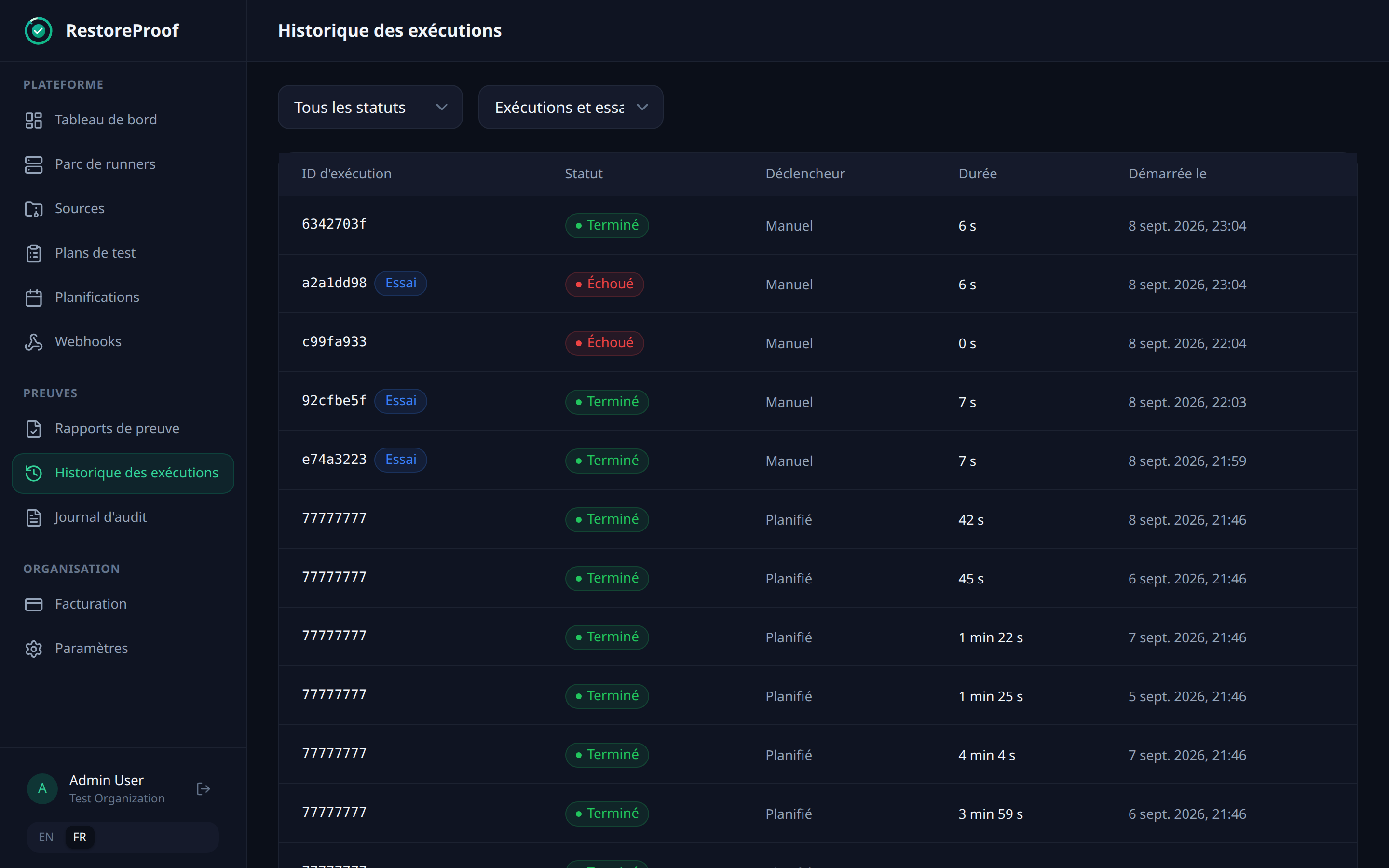
Each run leaves a timestamped, signed report naming the backup that was tested and what each probe measured. The history shows both plans side by side, and that is where you see which of the two parts is drifting.
What this chain does not prove
It proves that a recent dump restores into a fresh PostgreSQL, that the restored database describes repositories attached to accounts, and that the repository tree holds the expected directories.
It does not prove that a repository is clonable. The filesystem-canary probe observes the presence of HEAD, refs and objects; it does not ask Git to walk the objects, and a corrupted objects would pass that check. The git clone in the manual restore remains the only step that answers that question, and there is no plan step that replays it.
Nor does it prove that Gitea restarts on this data: for that, you need to start the application against the sandbox and add an http probe, as the recipe does for WordPress. Finally, it says nothing about what has been pushed since the last dump — that gap is your RPO, and it is tuned with the backup frequency, not with the tests.
Verify every restore, continuously
RestoreProof replays these steps on your own infrastructure, as often as you choose: it fetches the backup, restores it in a disposable container, asks the same questions, destroys everything, and signs the result. Your data never leaves your network.
FAQ
My developers all have a clone of the repository. Do I really need a backup?
A clone holds the code and its history, so losing the server does not lose the code. It loses everything else: issues, pull requests and their reviews, labels, milestones, access rights, webhooks, the tokens your CI pipelines use. None of that is in a clone, and all of it is in the database.
Is gitea dump enough?
For a small instance, yes. It gathers the three parts into a single archive. Its limits are disk space — it builds a full copy before writing the archive —, duration, which grows with the instance with no incremental upload possible, and the fact that the database and the repositories are not frozen at the same instant.
What do you lose by forgetting app.ini?
The restore works, but app.ini carries the SECRET_KEY with which Gitea encrypted certain values stored in the database: two-factor secrets, mirror passwords, OAuth application secrets. Without that file those values are unreadable, even with a perfectly restored database.
How do you check that a restored repository is actually usable?
By cloning it from the restored path, then reading its log. Git then reads HEAD, the refs and the objects, and rebuilds a working tree. The presence of the expected directories only proves presence.
Does a repository using LFS restore with the rest?
Only if the Gitea data archive is there. LFS objects are not in the bare repositories: they live under /data/gitea, alongside app.ini, the avatars and the attachments. An LFS repository restored without them clones, but does not come back complete: the files tracked by LFS are missing.