Back up PostgreSQL to S3 and verify the restore every night
Most PostgreSQL backup guides stop at the pg_dump command line. That is the easy part. What decides whether you get your data back is everything around it: what the dump leaves out, which format you chose, whether the script really fails when the dump fails, and whether anyone has ever replayed the file.
This guide covers the whole chain. By the end you will know what a PostgreSQL backup has to contain besides the database itself, how to pick between plain SQL, custom and directory, how to write a backup script that cannot report success on an empty file, how to restore the dump by hand in a throwaway container, and which four SQL queries tell you a restored database actually holds your data.
Everything up to that point works with pg_dump, docker and the AWS CLI, and nothing else. The last section shows how to run the same restore and the same checks on a schedule instead of by hand, which is what RestoreProof does — but the procedure stands on its own, and the day you need it, it is the one you will follow.
What a PostgreSQL backup has to contain
pg_dump backs up one database: its tables, its data, its views, its functions. It does not back up what lives beside it, at server level:
- roles and their passwords;
- the settings applied to the server (
postgresql.conf,pg_hba.conf); - the other databases on the same server.
Roles are retrieved with pg_dumpall --globals-only, which produces a small separate SQL file. Without it, the restore succeeds, but the application accounts no longer exist and nobody can connect.
Extensions, on the other hand, are in the dump — as a CREATE EXTENSION. They must therefore be installed on the server where you restore, otherwise the dump stops on that line. That is the classic trap with postgis and pgcrypto.
Choosing the dump format
| Format | Command | What it allows |
|---|---|---|
| Plain SQL | pg_dump | readable, fixable by hand, replayed with psql |
custom | pg_dump -Fc | already compressed, selective restore, table by table |
directory | pg_dump -Fd -j 4 | the only one produced and restored in parallel |
For a database of a few gigabytes, compressed plain SQL is enough and stays the easiest to inspect. Beyond that, directory with -j divides dump and restore time by the number of cores you give it.
Do not compress a -Fc or -Fd dump: it already is, and gzipping it again only burns CPU for a few percent.
The backup script
#!/bin/bash
set -euo pipefail

ts=$(date +%Y%m%d_%H%M%S)
dest=s3://sauvegardes-facturation/postgres

pg_dump -h db.interne -U sauvegarde -d facturation --no-owner --no-acl \
  | gzip > "/backups/facturation_${ts}.sql.gz"

pg_dumpall -h db.interne -U sauvegarde --globals-only \
  | gzip > "/backups/globals_${ts}.sql.gz"

aws s3 cp "/backups/facturation_${ts}.sql.gz" "${dest}/"
aws s3 cp "/backups/globals_${ts}.sql.gz" "${dest}/"
--no-owner --no-acl strips the original owners and privileges from the dump: without them, the restore asks for roles that only exist on the production server.
Without
pipefail, a failed dump comes out as a successIn
pg_dump | gzip, the shell only looks at the exit code of the last link.gzipsucceeds at compressing an empty stream, so the script returns 0 and cron is happy.set -o pipefail— included in theset -euo pipefailabove — makes the whole line fail as soon aspg_dumpfails. It is the number one cause of empty backups that stay green for months.
Keep the timestamp in the file name: a file always overwritten under the same name leaves no chance of going back to yesterday. For retention, a lifecycle rule on the bucket does the job with no script to maintain: objects older than N days are deleted by the storage itself.
That leaves running it every night. A cron is enough, on two conditions: that its error output goes somewhere someone reads, and that a run dragging on does not overlap with the next one — flock -n on a lock file settles the second point in one line.
Restoring once, by hand
A backup is only proven once restored. Do it once, in full, on a throwaway machine — it is also the procedure you will follow the day it matters.
docker run -d --name pg-essai -e POSTGRES_PASSWORD=essai postgres:17-alpine
until docker exec pg-essai pg_isready -q; do sleep 1; done

docker exec pg-essai createdb -U postgres facturation
gunzip -c /backups/globals_20260918_010000.sql.gz \
  | docker exec -i pg-essai psql -U postgres -v ON_ERROR_STOP=1 -d postgres
gunzip -c /backups/facturation_20260918_010000.sql.gz \
  | docker exec -i pg-essai psql -U postgres -v ON_ERROR_STOP=1 -d facturation
ON_ERROR_STOP=1 is essential: without it, psql carries on after an error and you end up with a half-restored database that looks like it works.
Note how long it took. That is your real restore duration, the only one worth comparing to the delay you promised.
What to check in a restored database
The dump replayed without an error does not mean the data is there. Four questions, in this order:
select count(*) from information_schema.tables where table_schema = 'public';
select count(*) from factures;
select max(created_at) from factures;
select last_value from factures_id_seq;
- The tables are there. Zero tables means an empty dump that replayed perfectly.
- The rows are there. Compare against the order of magnitude in production, not an exact number: a database that grows is normal.
- The data is recent. The most recent date should be yesterday's, not last month's. That is what catches a backup job that stopped running.
- The sequences kept up. A sequence left at 1 causes key collisions on the first write after the restore.
Then destroy everything: docker rm -f pg-essai.
Automating this verification
What precedes costs an hour or two, every time. That is the reason these tests, done by hand, end up not being done at all.
RestoreProof replays exactly these steps as a scheduled task, on your own infrastructure: a runner fetches the backup, restores it in a disposable container, asks the same questions as above, destroys everything, and signs the result. The data does not leave your premises.
First declare the backup as a source — the bucket, the prefix, the *.sql.gz pattern, and the most recently modified strategy. Access keys are not entered: the plan carries a reference, env://AWS_ACCESS_KEY_ID, which the runner resolves in its own environment. See secret references.
The PostgreSQL wizard then writes the plan, and that plan is the procedure you just ran by hand, line for line:
| By hand | In the plan |
|---|---|
aws s3 cp from the bucket | fetch, which takes the most recent file |
gunzip -c | unpack |
docker run postgres:17-alpine | start_sandbox |
psql -v ON_ERROR_STOP=1 | restore_postgres |
| the four queries | one postgres probe per question |
docker rm -f | the cleanup, always executed |
The only addition is max_age: 26h, and it is the one check a restore cannot deduce from the content: it fails the run when the most recent backup found at the source is older than that. The full plan, ready to paste into the editor, is in the database recipe.
The sandbox version
postgres:17-alpinemust match the major version of your server. A dump taken on a newer server does not replay on an older one.
Thresholds are not copied from this page. A trial restores your backup, counts what it actually contains, and suggests each threshold 5 % below the measured value, with the gte operator.
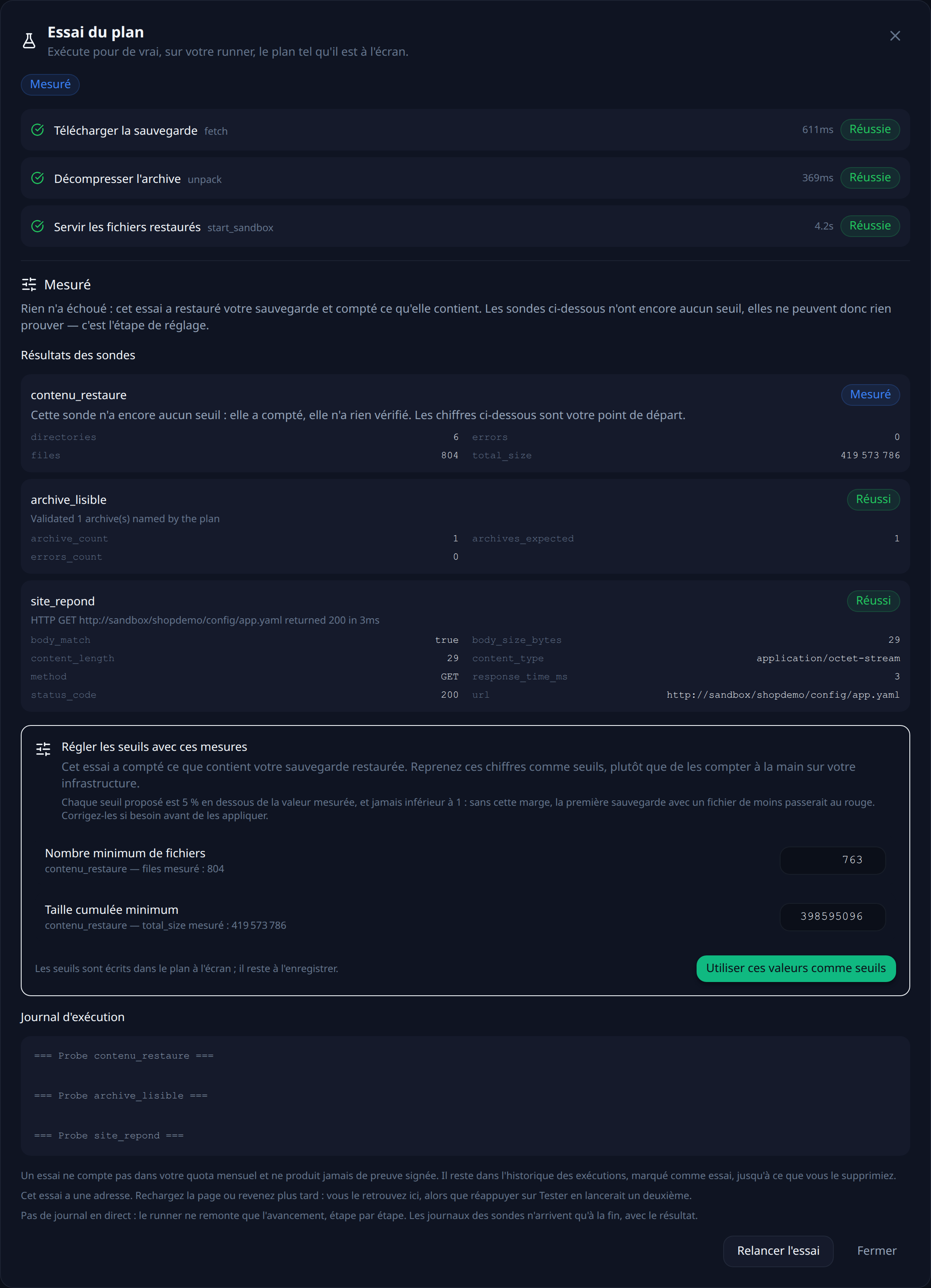
That leaves choosing a frequency. Every night puts the run at 2 a.m.: your backup script runs at 1 a.m., so the dump is one hour old when it is tested. The other possible trigger is an HTTP call at the end of that script — the test then covers exactly the file that was just produced.
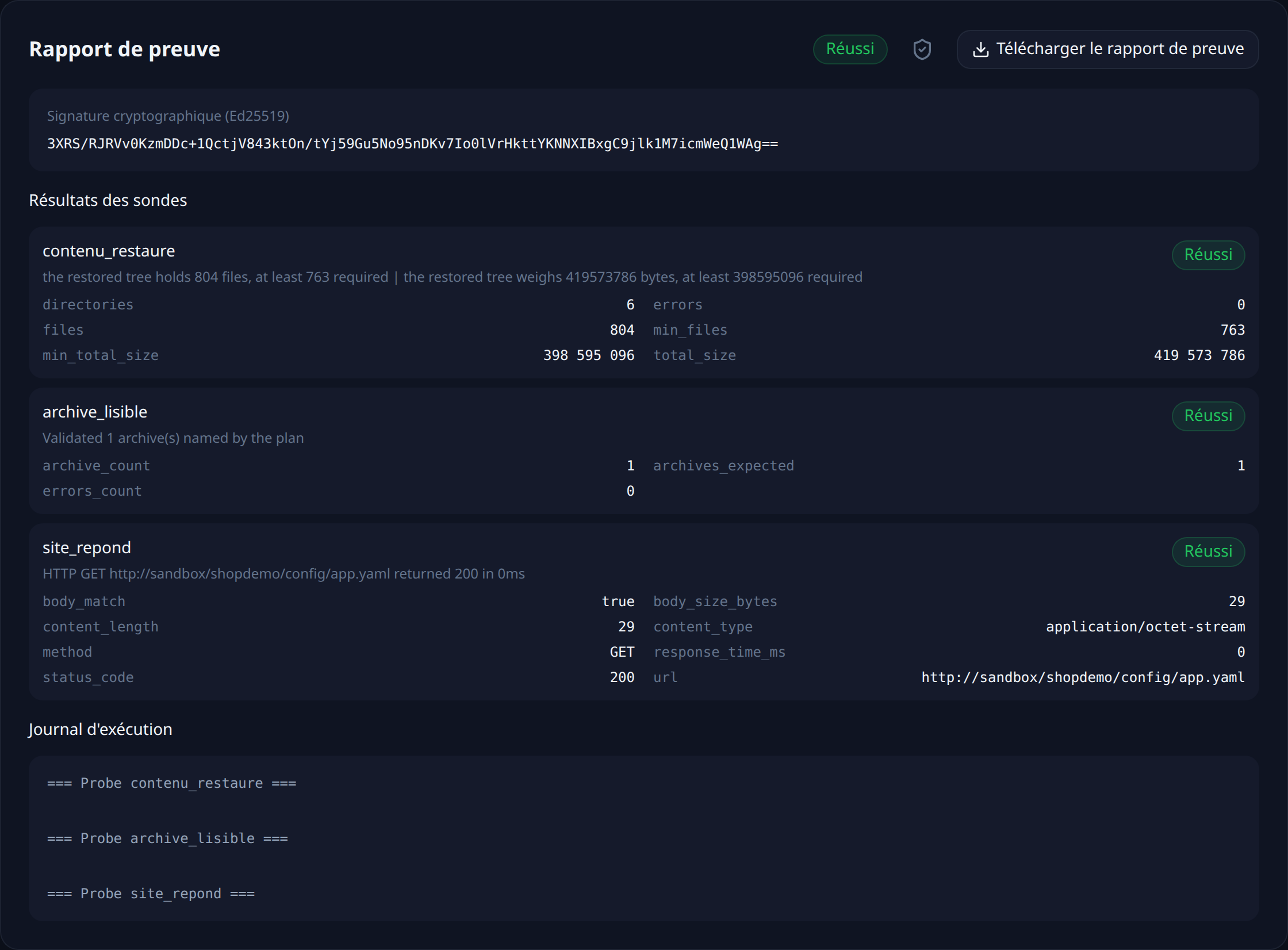
Each run leaves a timestamped, signed report naming the backup that was tested and what each probe measured.
What this chain does not prove
It proves that a recent backup restores into a fresh PostgreSQL and that it contains the expected data. It does not prove that your application works on that database: for that, you need to start it against the sandbox and add an http probe. It says nothing either about what has been created since the last dump — that gap is your RPO, and it is tuned with the backup frequency, not with the tests.
Verify every restore, continuously
RestoreProof replays these steps on your own infrastructure, as often as you choose: it fetches the backup, restores it in a disposable container, asks the same questions, destroys everything, and signs the result. Your data never leaves your network.
FAQ
How often should a restore be tested?
As often as the backup runs, if you can. A nightly restore test surfaces a broken backup the morning after it breaks, rather than the day you need it.
A backup job that finishes green means the backup works, doesn't it?
It means the job ran without reporting an error. It says nothing about whether the file can be replayed. A pg_dump | gzip pipeline without pipefail returns success on an empty file. A dump taken by a role that cannot read every table restores perfectly with half the data. A schedule that stopped firing leaves behind a dump that still restores. Only a restore, followed by counting what came out, distinguishes a backup that exists from a backup that restores.
What does pg_dump not back up?
Roles and their passwords, the server-level configuration (postgresql.conf, pg_hba.conf), and the other databases on the same server. Roles are dumped separately with pg_dumpall --globals-only. Extensions are in the dump as CREATE EXTENSION, which means they must be installed on the server you restore onto, or the restore stops on that line.
What does an ISO 27001 or NIS2 auditor ask for?
Evidence that the restore procedure has been exercised, not just written down: when the test ran, on which backup, what was checked, and what the result was. A dated report naming the backup that was restored and what each check measured answers that directly, where a screenshot of a green backup dashboard does not.
Why automate it instead of testing by hand?
Because a manual restore test takes an hour or two every time, which is exactly why it stops being done. The value of automating is not that the machine does it better — it is that it still gets done in six months.