Back up MySQL to S3 and verify the restore every night
Most MySQL backup guides stop at the mysqldump command line. That is the easy part. What decides whether you get your data back is everything around it: what the dump leaves out, which options you passed, whether the script really fails when the dump fails, and whether anyone has ever replayed the file.
This guide covers the whole chain. By the end you will know what a MySQL backup has to contain besides the tables, which mysqldump options actually change something, how to write a script that cannot report success on an empty file, how to restore the dump by hand in a throwaway container, and which four SQL queries tell you a restored database actually holds your data. MariaDB follows the same path, down to the container image.
Everything up to that point works with mysqldump, docker and the AWS CLI, and nothing else. The last section shows how to run the same restore and the same checks on a schedule instead of by hand, which is what RestoreProof does — but the procedure stands on its own, and the day you need it, it is the one you will follow.
What a MySQL backup has to contain
mysqldump writes SQL: the CREATE TABLE and INSERT statements of the databases you name. What lives at server level is not in there:
- the accounts and their grants, which are in the
mysqldatabase; - the other databases on the same server, if you did not pass
--databases; - the server configuration (
my.cnf,/etc/mysql/conf.d/).
Two things go missing even more quietly, because mysqldump does not take them by default: stored procedures and functions, and scheduler events. Triggers, on the other hand, are taken by default. A database restored without its procedures reads perfectly and computes nothing any more.
The storage engine is written into the dump, on every CREATE TABLE, as ENGINE=InnoDB. It must therefore exist on the server where you restore: a dump of MyISAM tables replays on a MySQL 8, but a dump produced with a third-party engine stops on the first table. Count your engines once on production, with select engine, count(*) from information_schema.tables group by engine, and you will know what you are dealing with.
The options that matter
| Option | What it changes |
|---|---|
--single-transaction | a consistent snapshot of InnoDB tables, without locking production |
--routines --events | adds procedures, functions and events, absent without it |
--triggers | already on by default: do not turn it off |
--databases | puts a CREATE DATABASE and a USE in the dump, which therefore recreates the database itself |
--set-gtid-purged=OFF | strips the SET @@GLOBAL.gtid_purged carried by a dump taken on a GTID server |
--single-transaction only protects what is transactional. On MyISAM tables it does nothing at all: the only consistency available comes from --lock-tables, which blocks writes for the duration of the dump. A database mixing both engines cannot be backed up consistently in a single command — a good reason to finish migrating to InnoDB.
--set-gtid-purged=OFF only matters if your server runs with GTID enabled. In that case the dump starts by setting the replication position, which a test server that has already executed transactions refuses to replay.
The backup script
#!/bin/bash
set -euo pipefail

ts=$(date +%Y%m%d_%H%M%S)
dest=s3://sauvegardes-facturation/mysql
cnf=/etc/mysql/sauvegarde.cnf

mysqldump --defaults-extra-file="${cnf}" \
  --single-transaction --routines --events --triggers \
  --databases facturation \
  | gzip > "/backups/facturation_${ts}.sql.gz"

mysql --defaults-extra-file="${cnf}" -N -B \
  -e "select user, host from mysql.user where user not like 'mysql.%'" \
  | while read -r u h; do
      mysql --defaults-extra-file="${cnf}" -N -B \
        -e "show grants for '${u}'@'${h}'"
    done | sed 's/$/;/' > "/backups/droits_${ts}.sql"

aws s3 cp "/backups/facturation_${ts}.sql.gz" "${dest}/"
aws s3 cp "/backups/droits_${ts}.sql" "${dest}/"
The password is in sauvegarde.cnf, under a [client] section, not on the command line: a -ppassword is readable by anyone in the process list for the whole duration of the dump.
The show grants loop produces a replayable grants file. SHOW GRANTS returns its lines without a trailing semicolon, hence the sed: without it, the file replays as a single statement and fails.
Without
pipefail, a failed dump comes out as a successIn
mysqldump | gzip, the shell only looks at the exit code of the last link.gzipsucceeds at compressing an empty stream, so the script returns 0 and cron is happy.set -o pipefail— included in theset -euo pipefailabove — makes the whole line fail as soon asmysqldumpfails. It is the number one cause of empty backups that stay green for months.
Keep the timestamp in the file name: a file always overwritten under the same name leaves no chance of going back to yesterday. For retention, a lifecycle rule on the bucket does the job with no script to maintain.
That leaves running it every night. A cron is enough, on two conditions: that its error output goes somewhere someone reads, and that a run dragging on does not overlap with the next one — flock -n on a lock file settles the second point in one line.
Restoring once, by hand
A backup is only proven once restored. Do it once, in full, on a throwaway machine — it is also the procedure you will follow the day it matters.
docker run -d --name mysql-essai -e MYSQL_ROOT_PASSWORD=essai mysql:8.4
until docker exec mysql-essai mysqladmin ping -uroot -pessai --silent; do
  sleep 1
done

gunzip -c /backups/facturation_20260918_010000.sql.gz \
  | docker exec -i mysql-essai mysql -uroot -pessai
No database is named at restore time: the dump was taken with --databases, so it carries its own CREATE DATABASE facturation.
The mysql client stops on the first error, and that is what you want. Do not add --force to a restore test: it turns a truncated dump into a half-filled database that looks like it works.
Two details that cost an evening. If your client comes from MariaDB — which is the case in Alpine images — it verifies the server certificate and refuses to connect to a MySQL 8 presenting its self-signed one: --skip-ssl on mysql, mysqldump and mysqladmin lifts that for a local test. And the container answers ping before it has finished initializing, hence the wait above rather than a fixed sleep.
Note how long it took. That is your real restore duration, the only one worth comparing to the delay you promised.
What to check in a restored database
The dump replayed without an error does not mean the data is there. Four questions, in this order:
select count(*) from information_schema.tables where table_schema = 'facturation';
select count(*) from factures;
select count(*) from factures where created_at > now() - interval 2 day;
select auto_increment from information_schema.tables
  where table_schema = 'facturation' and table_name = 'factures';
- The tables are there. Zero tables means an empty dump that replayed perfectly.
- The rows are there. Compare against the order of magnitude in production, not an exact number: a database that grows is normal.
- The data is recent. Ask that question by counting yesterday's rows, not by reading a date: a number compares against a threshold, a date does not. Zero here means a backup job that stopped running.
- The counters kept up. An
AUTO_INCREMENTback down to 1 causes key collisions on the first write after the restore.
Then destroy everything: docker rm -f mysql-essai.
Automating this verification
What precedes costs an hour or two, every time. That is the reason these tests, done by hand, end up not being done at all.
RestoreProof replays exactly these steps as a scheduled task, on your own infrastructure: a runner fetches the backup, restores it in a disposable container, asks the same questions as above, destroys everything, and signs the result. The data does not leave your premises.
First declare the backup as a source — the bucket, the prefix, the *.sql.gz pattern, and the most recently modified strategy. Access keys are not entered: the plan carries a reference, env://AWS_ACCESS_KEY_ID, which the runner resolves in its own environment. See secret references and how to adapt the fetch block.
The MySQL Database wizard then writes the plan, and that plan is the procedure you just ran by hand, line for line:
| By hand | In the plan |
|---|---|
aws s3 cp from the bucket | fetch, which takes the most recent file |
gunzip -c | unpack |
docker run mysql:8.4 | start_sandbox |
mysql without --force | restore_mysql |
| the four queries | one mysql probe per question |
docker rm -f | the cleanup, always executed |
The only addition is max_age: 26h, and it is the one check a restore cannot deduce from the content: it fails the run when the most recent backup found at the source is older than that. The full plan, ready to paste into the editor, is in the database recipe.
The first two questions are asked by naming a table, the other two by writing the query. A probe carrying its own query has to return a number: the threshold applies to that number.
The sandbox version
mysql:8.4must match the major version of your server. A dump taken on a newer server does not replay on an older one. For MariaDB, the plan is the same: only the image changes, tomariadb:11ormariadb:10.11.
Thresholds are not copied from this page. A trial restores your backup, counts what it actually contains, and suggests each threshold 5 % below the measured value, with the gte operator. See how to find the thresholds.
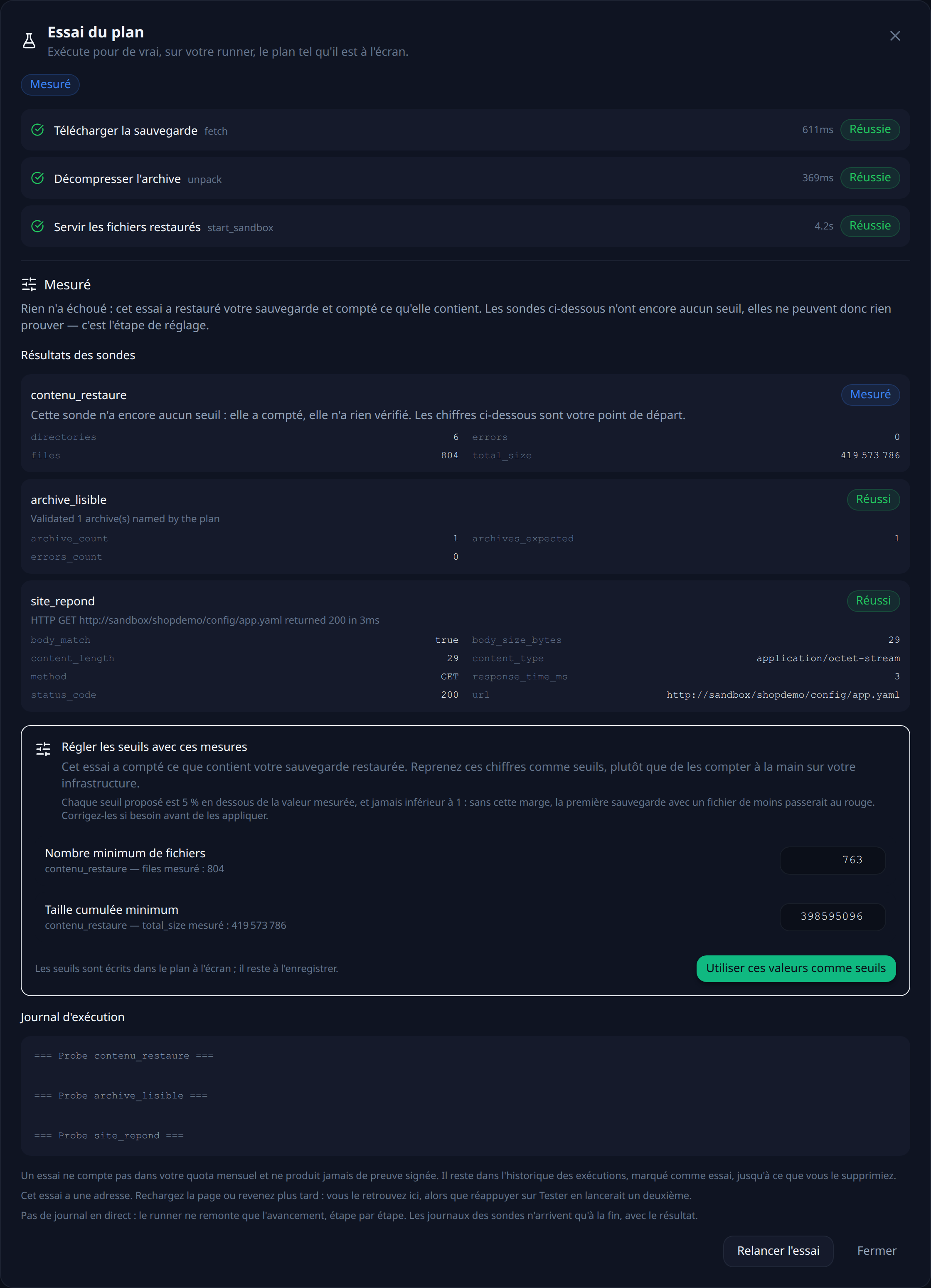
That leaves choosing a frequency. Every night puts the run at 2 a.m.: your backup script runs at 1 a.m., so the dump is one hour old when it is tested. The other possible trigger is an HTTP call at the end of that script — the test then covers exactly the file that was just produced.
Each run leaves a timestamped, signed report naming the backup that was tested and what each probe measured.
What this chain does not prove
It proves that a recent backup restores into a fresh MySQL and that it contains the expected data. It proves nothing about the accounts and their grants, which live in another file: to exercise those, you have to replay the grants file and connect with one of those accounts. It does not prove either that your application works on that database: for that, you need to start it against the sandbox and add an http probe. And it says nothing about what has been written since the last dump — that gap is your RPO, and it is tuned with the backup frequency, not with the tests.
Verify every restore, continuously
RestoreProof replays these steps on your own infrastructure, as often as you choose: it fetches the backup, restores it in a disposable container, asks the same questions, destroys everything, and signs the result. Your data never leaves your network.
FAQ
What does mysqldump not back up?
Accounts and their grants, which live in the mysql database, the other databases on the server if you did not pass --databases, and the server configuration. Stored procedures, functions and events are not included by default: that takes --routines --events. Triggers, on the other hand, are included by default.
Is --single-transaction enough for a consistent backup?
On InnoDB tables, yes, and without blocking writes. On MyISAM tables it does nothing: those tables are not transactional, and the only consistency available comes from --lock-tables, which blocks production for the duration of the dump.
Why does a dump refuse to replay with a gtid_purged error?
Because it was taken on a server with GTID enabled: the file starts by setting SET @@GLOBAL.gtid_purged, and a test server that has already executed transactions refuses that line. --set-gtid-purged=OFF at dump time strips it, and the file replays anywhere.
How do I test a MariaDB backup?
With the same procedure and the same plan: only the throwaway container image changes, to mariadb:11 or mariadb:10.11. The dump is the same SQL, and the MariaDB client replays it.
How do I back up MySQL accounts and their grants?
Not with the dump of your database: they live in the mysql database. You produce a replayable file by walking the accounts in mysql.user and asking SHOW GRANTS for each one. One precaution: SHOW GRANTS returns its lines without a trailing semicolon, and without it the file replays as a single statement and fails.