Back up an OpenLDAP directory: two exports, one reload, four checks
A directory is the front door to everything else. When it does not come back, nobody signs in to anything — and it is the kind of backup you discover is incomplete the day you need it, because an LDIF export of a live directory looks perfectly valid right up to the moment you try to reload it onto a fresh server.
This guide covers the whole chain. By the end you will know why a directory backup is two exports and not one, what slapcat guarantees that ldapsearch does not, what your LDIF really contains — including what will make the reload fail —, how to reload the export by hand in a throwaway container, and which four ldapsearch commands tell you a restored directory is usable.
Everything up to that point works with the OpenLDAP tools, docker and the AWS CLI, and nothing else. The last section shows how to run the same reload and the same checks on a schedule instead of by hand, which is what RestoreProof does — but the procedure stands on its own, and the day you need it, it is the one you will follow.
A directory backup is two exports
An OpenLDAP directory lives in two databases, and a backup that takes only one of them does not reload.
The first is the data tree: your organisational units, your accounts, your groups. That is the one everybody exports, with slapcat or with ldapsearch.
The second is the configuration tree, cn=config: the schemas, the access rules, the loaded overlays, the indexes. It holds none of your accounts, and yet it is the one that decides whether the data export can be reloaded at all. A directory that picked up a home-made attribute over the years — matricule, caseNumber, anything a business application added — describes that attribute in cn=config, and nowhere else. Without that export, you have a data file that the restore server refuses to write, entry after entry, without knowing why.
Forgetting cn=config also costs you the access rules. A directory reloaded without them is a directory whose entries are all there and whose applications no longer read what they used to read.
slapcat cold, ldapsearch hot
slapcat reads the database files directly, on the server, without going through slapd. It is fast, it uses no connection, it is subject to no size limit — but it reads a database that moves. An export taken while writes are coming in can hold one entry in its state before a change and another in its state after. For a directory that is almost never serious: entries are independent. It becomes serious when the change in flight touches an account and the group that references it: you get a group pointing at a member that is not there. The only genuinely frozen export is the one taken with slapd stopped.
ldapsearch goes through the server, and so needs neither disk access nor a service outage: it runs from any machine that can reach port 389. Every entry it returns is consistent, but the whole is no more consistent than with slapcat: the read happens entry by entry, with no frozen view.
Two traps are its own. The server applies a size limit to results — sizelimit, 500 entries by default in slapd: past that it stops, and your export stops with it. Take the export with the directory's administrator account, which is not subject to it, and look at the exit code. And by default ldapsearch only returns application attributes: you have to ask for "*" "+" to also get what the server built.
What the LDIF really contains
Three things people usually discover at reload time.
The passwords are in there, as hashes. A userPassword: {SSHA}xxxxx reloads as it is, and the account signs in with its original password. Two consequences: the export file is worth exactly what the directory is worth, so it is protected the same way; and the only check that proves people will still get in is a successful authentication after the restore, not a count of entries.
Operational attributes belong to the server. entryUUID, entryCSN, structuralObjectClass, creatorsName, createTimestamp, modifiersName, modifyTimestamp, entryDN, contextCSN, memberOf, the password-policy attributes in pwd…: the server builds them itself and refuses to have them written. A slapcat export, or an ldapsearch with "+", contains all of them — they have to be stripped before reloading. memberOf is the most misleading case: it is computed by an overlay from the groups, and reimporting it amounts to freezing memberships the server is going to recompute on its side.
Custom schemas live elsewhere. The entries carrying a home-made attribute depend on it, and that attribute is not in the data export. That is the whole point of the second export.
The backup script
On the directory server, both exports and their upload:
#!/bin/bash
set -euo pipefail

ts=$(date +%Y%m%d_%H%M%S)
dest=s3://sauvegardes-annuaire/ldap

slapcat -n 0 -o ldif-wrap=no | gzip > "/backups/config_${ts}.ldif.gz"
slapcat -n 1 -o ldif-wrap=no | gzip > "/backups/annuaire_${ts}.ldif.gz"

aws s3 cp "/backups/config_${ts}.ldif.gz" "${dest}/"
aws s3 cp "/backups/annuaire_${ts}.ldif.gz" "${dest}/"
-n 0 names the configuration database, -n 1 the first data database. -o ldif-wrap=no stops long lines from being folded at 78 columns: without it, a long attribute is cut and continues on the next line, preceded by a space. A folded file reloads perfectly well, but it can no longer be filtered line by line — and that is exactly what you are about to have to do.
If you have no shell access to the directory server, the data export is taken remotely, along the same lines:
ldapsearch -x -H ldap://annuaire.interne \
  -D cn=admin,dc=exemple,dc=com -w "$LDAP_ADMIN_PASSWORD" \
  -b dc=exemple,dc=com -LLL -o ldif-wrap=no "(objectClass=*)" "*" "+" \
  | gzip > "/backups/annuaire_${ts}.ldif.gz"
Without
pipefail, a failed export comes out as a successIn
slapcat | gzip, the shell only looks at the exit code of the last link.gzipsucceeds at compressing an empty stream, so the script returns 0 and cron is happy.set -o pipefail— included in theset -euo pipefailabove — makes the whole line fail as soon asslapcatfails. It is the number one cause of empty backups that stay green for months.
Keep the timestamp in the file names, and keep both exports of the same timestamp together: a schema that does not match the data being reloaded is of no use. For retention, a lifecycle rule on the bucket deletes objects older than N days with no script to maintain.
Reloading once, by hand
An export is only proven once reloaded, onto a server that knows nothing about the old one. A throwaway container is enough.
docker run -d --name ldap-essai \
  -e LDAP_ROOT=dc=exemple,dc=com \
  -e LDAP_ADMIN_USERNAME=admin \
  -e LDAP_ADMIN_PASSWORD=essai \
  -e LDAP_SKIP_DEFAULT_TREE=yes \
  -e LDAP_CONFIG_ADMIN_ENABLED=yes \
  -e LDAP_CONFIG_ADMIN_PASSWORD=essai-config \
  bitnamilegacy/openldap:2.6.10-debian-12-r4

until docker exec ldap-essai ldapsearch -x -H ldap://localhost:1389 \
  -b "" -s base namingContexts >/dev/null 2>&1; do sleep 1; done
LDAP_SKIP_DEFAULT_TREE is essential: without it, the image creates its own demonstration tree under LDAP_ROOT, and those entries collide with yours at reload time ("entry already exists"). A perfectly restorable export then fails for a reason that has nothing to do with it.
That leaves stripping the operational attributes and loading the data. This is where the ldif-wrap=no of the export pays off: the filter works line by line.
gunzip -c /backups/annuaire_20260918_030000.ldif.gz \
  | grep -viE '^(structuralObjectClass|entryUUID|entryCSN|creatorsName|createTimestamp|modifiersName|modifyTimestamp|entryDN|subschemaSubentry|hasSubordinates|numSubordinates|contextCSN|memberOf|pwd[A-Za-z]+):' \
  > /tmp/annuaire.ldif

docker exec -i ldap-essai ldapadd -x -H ldap://localhost:1389 \
  -D cn=admin,dc=exemple,dc=com -w essai < /tmp/annuaire.ldif
On a directory with a custom schema, this is where it stops:
adding new entry "cn=camille.durand,ou=people,dc=exemple,dc=com"
ldap_add: Undefined attribute type (17)
	additional info: matricule: attribute type undefined
ldapadd stops on the first entry carrying an attribute the server does not know, and says nothing about the next ones. An export that uses three of them therefore takes three full reloads to diagnose, and you only learn about the next missing one once you have fixed the previous one.
The fix is in the cn=config export. You do not replay it whole onto a fresh server: it describes the file paths, the databases and the overlays of the old server. What you take out of it are the schema entries, under cn=schema,cn=config, and only the ones your applications added — core, cosine, inetorgperson and nis are already in the image. A schema entry looks like this:
dn: cn=monschema,cn=schema,cn=config
objectClass: olcSchemaConfig
cn: monschema
olcAttributeTypes: ( 1.3.6.1.4.1.99999.1.1 NAME 'matricule' DESC 'matricule RH' EQUALITY caseIgnoreMatch SYNTAX 1.3.6.1.4.1.1466.115.121.1.15 SINGLE-VALUE )
olcObjectClasses: ( 1.3.6.1.4.1.99999.1.2 NAME 'salarie' SUP top AUXILIARY MAY ( matricule ) )
It loads into the configuration tree, with that tree's administrator account — which is not the directory's — before the data:
docker exec -i ldap-essai ldapadd -x -H ldap://localhost:1389 \
  -D cn=admin,cn=config -w essai-config < /tmp/schema.ldif

docker exec -i ldap-essai ldapadd -x -H ldap://localhost:1389 \
  -D cn=admin,dc=exemple,dc=com -w essai < /tmp/annuaire.ldif
That is also the order you will have to replay them in the day you restore for real. Note how long it took: that is your real restore duration, the only one worth comparing to the delay you promised.
What to check in a reloaded directory
The reload ran without an error does not mean the directory is usable. Four questions, in this order:
ldapsearch -x -H ldap://localhost:1389 -D cn=admin,dc=exemple,dc=com -w essai \
  -b ou=people,dc=exemple,dc=com -LLL "(objectClass=inetOrgPerson)" dn \
  | grep -c '^dn:'

ldapsearch -x -H ldap://localhost:1389 -D cn=admin,dc=exemple,dc=com -w essai \
  -b cn=camille.durand,ou=people,dc=exemple,dc=com -s base -LLL dn

ldapsearch -x -H ldap://localhost:1389 -D cn=admin,dc=exemple,dc=com -w essai \
  -b ou=groups,dc=exemple,dc=com -LLL "(cn=support)" member

ldapsearch -x -H ldap://localhost:1389 \
  -D cn=camille.durand,ou=people,dc=exemple,dc=com -w "$MOT_DE_PASSE_CAMILLE" \
  -b "" -s base -LLL namingContexts
- The accounts are there. Compare against the order of magnitude in production, not an exact number. And check the command's exit code: if the server hit its size limit, the count is wrong on the low side.
- A known account is there, that one precisely. Six entries are not necessarily the right six: looking an entry up by its full DN is stronger than a count.
- The memberships are there. Groups decide privileges. A directory reloaded without its
membervalues is a directory where everyone lost their access — and it is the first symptom of amemberOfreimported in place of the groups themselves. - The passwords work. That last command queries nothing useful: it authenticates as
camille.durand. It is the only one that proves the hashes came back usable. An export that reloads everything except theuserPasswordvalues gives a directory that looks perfect and lets nobody in.
Then destroy everything: docker rm -f ldap-essai.
Automating this verification
What precedes costs an hour or two, every time. That is the reason these tests, done by hand, end up not being done at all.
RestoreProof replays exactly these steps as a scheduled task, on your own infrastructure: a runner fetches the export, reloads it in a disposable container, asks the same questions as above, destroys everything, and signs the result. The data does not leave your premises.
First declare the backup as a source — the bucket, the prefix, the *.ldif pattern, and the most recently modified strategy. Access keys are not entered: the plan carries a reference, env://AWS_ACCESS_KEY_ID, which the runner resolves in its own environment. See secret references.
The OpenLDAP wizard then writes the plan, and that plan is the procedure you just ran by hand, line for line:
| By hand | In the plan |
|---|---|
aws s3 cp of the most recent export | fetch |
gunzip -c | unpack |
the docker run of the OpenLDAP image | start_sandbox |
the ldapadd of the schema into cn=config | exec_in_sandbox |
the grep -v of the operational attributes | restore_ldap, with format: "auto" |
the ldapadd of the data | restore_ldap |
ldapsearch … | grep -c '^dn:' | RESTOREPROOF_LDAP_BASE_DN and _EXPECTED_ENTRIES |
| the lookup of the known DN | RESTOREPROOF_LDAP_EXPECT_DN |
the ldapsearch that authenticates | RESTOREPROOF_LDAP_TEST_BIND_DN and _TEST_BIND_PASSWORD |
docker rm -f | the cleanup, always executed |
Three things are not entered. The host, the port and the administrator DN: the runner recognises the sandbox by its image name — openldap, 389ds, dirsrv or lldap — and composes cn=admin,<suffix> itself from the suffix set in LDAP_ROOT. The stripping of the operational attributes: with format: "auto", the restore_ldap step looks at the beginning of the file, recognises a server dump in it, and filters. And the schema diagnosis: before writing the first entry, the runner asks the sandbox server what it can accept, compares it to what your export uses, and hands back the complete list at once — every missing attribute type, every missing object class. This is not a softening: the run fails. An export that does not reload onto a fresh server is not restorable, and that is what needed discovering today rather than during an outage.
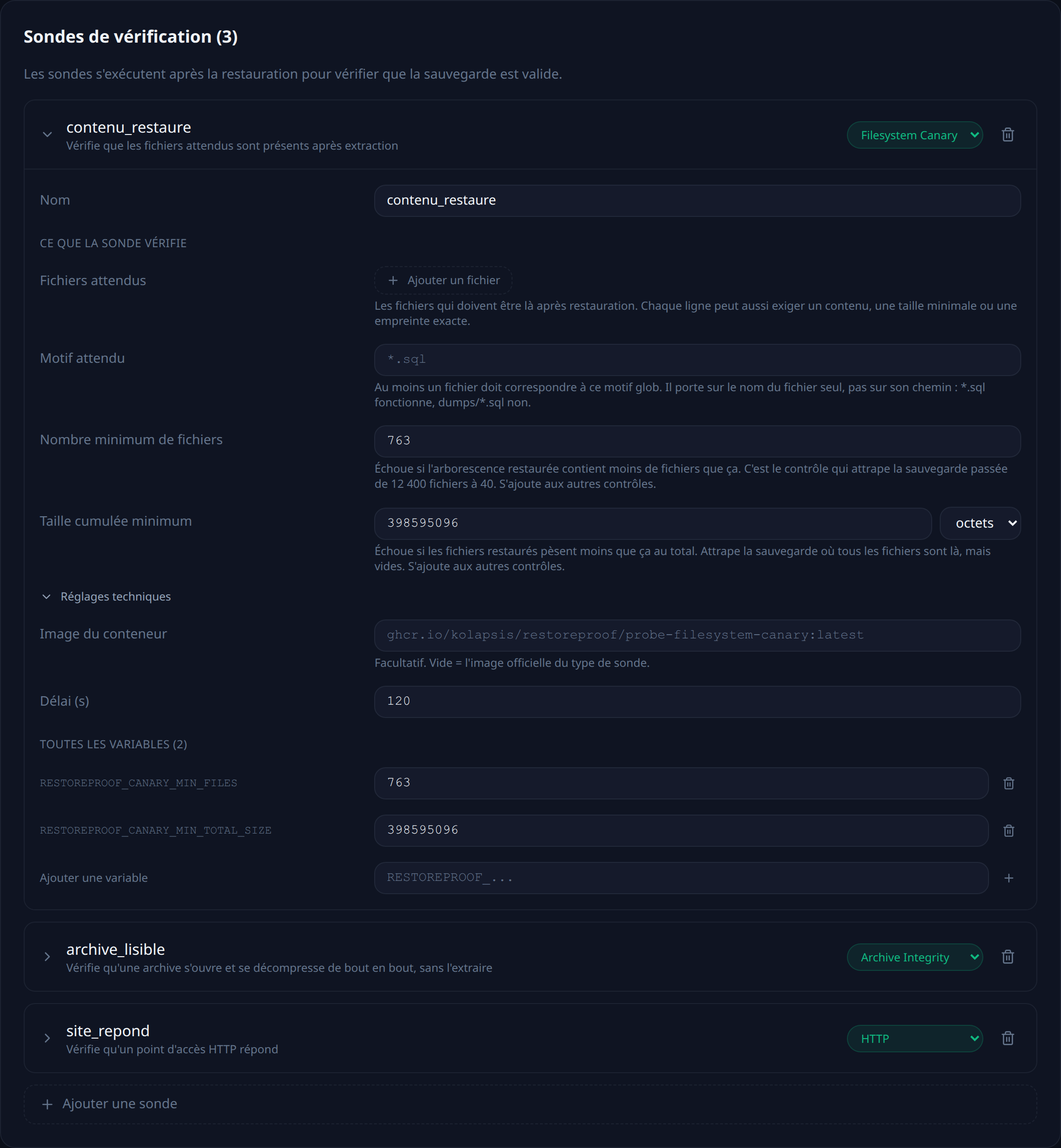
The ldap probe does all four checks at once: it counts the entries under a subtree with a filter and an operator (gte, lte, eq), requires a precise DN, and authenticates with a restored account. It refuses to pass if none of the three is configured — a probe that checks nothing proves nothing.
The full plan, with the schema-loading step and both probes, is in the LDAP recipe.
The only addition compared to your manual procedure is max_age, and it is the one check a reload cannot deduce from the content: it fails the run when the most recent export found at the source is older than that. A March directory reloads perfectly in September.
Thresholds are not copied from this page. A trial reloads your export, counts what it actually contains, and suggests each threshold below the measured value.
That leaves choosing a frequency. Every night puts the run one hour after your export: it is one hour old when it is tested. The other possible trigger is an HTTP call at the end of the backup script — the test then covers exactly the files that were just produced.
Each run leaves a timestamped, signed report naming the export that was tested and what each probe measured.
What this chain does not prove
It proves that the most recent export reloads into a fresh OpenLDAP, that the expected entries and groups are there, and that a restored account still authenticates.
It does not prove that the rest of cn=config came back: the access rules, the overlays and the indexes are not replayed in the sandbox, only the schemas are. It says nothing about replication between your servers. And the reloaded directory is not identical byte for byte to the original: the operational attributes were rebuilt by the sandbox server, which is just as well — what matters to you is that your users sign back in. Finally, it says nothing about what has been created since the last export: that gap is your RPO, and it is tuned with the backup frequency, not with the tests.
Verify every restore, continuously
RestoreProof replays these steps on your own infrastructure, as often as you choose: it fetches the export, reloads it in a disposable container, asks the same questions, destroys everything, and signs the result. Your data never leaves your network.
FAQ
Is an LDIF export of the right size good enough?
No. A complete data export does not reload onto a fresh server as soon as the directory uses a custom attribute: ldapadd stops on the first entry carrying it. File size says nothing about that, and nothing either about the operational attributes you have to strip before replaying it.
What is in cn=config, and why back it up?
The schemas, the access rules, the loaded overlays and the indexes. None of your accounts. Yet it is that export which makes the other one reloadable: the custom attributes your entries depend on are described there, and nowhere else.
Do you have to stop slapd to take a backup?
For a genuinely frozen export, yes. Taken hot, entries stay individually consistent, but a group and the account it references can be captured on either side of a change. On most directories that trade-off is worth it; on a directory that changes constantly, stopping the service is the only export without surprises.
Why can a restored account no longer sign in?
Because the userPassword values were not reloaded, or not as they were. The LDIF holds them as hashes, which replay identically — but a filtered export, or one taken by an account that cannot read them, gives a directory that looks perfect and lets nobody in. Only a successful authentication after the restore proves otherwise.
Why does an ldapsearch export stop at 500 entries?
Because the server applies a size limit to results, sizelimit, set to 500 entries by default in slapd. Past that the search stops and the export stops with it, on a file that looks perfectly normal. Take the export with the directory's administrator account, which is not subject to it, and read the command's exit code.